Laptop work on the go
Airports, trains and client sites: keep the laptop running without a socket.
| Runs | Approx. |
|---|---|
| MacBook Air M2 15-inch | ≈ 1.0 charge |
| MacBook Pro 16-inch, 40 min | ≈ 50% |
Use: Laptop on USB-C1 with the included 100W cable.





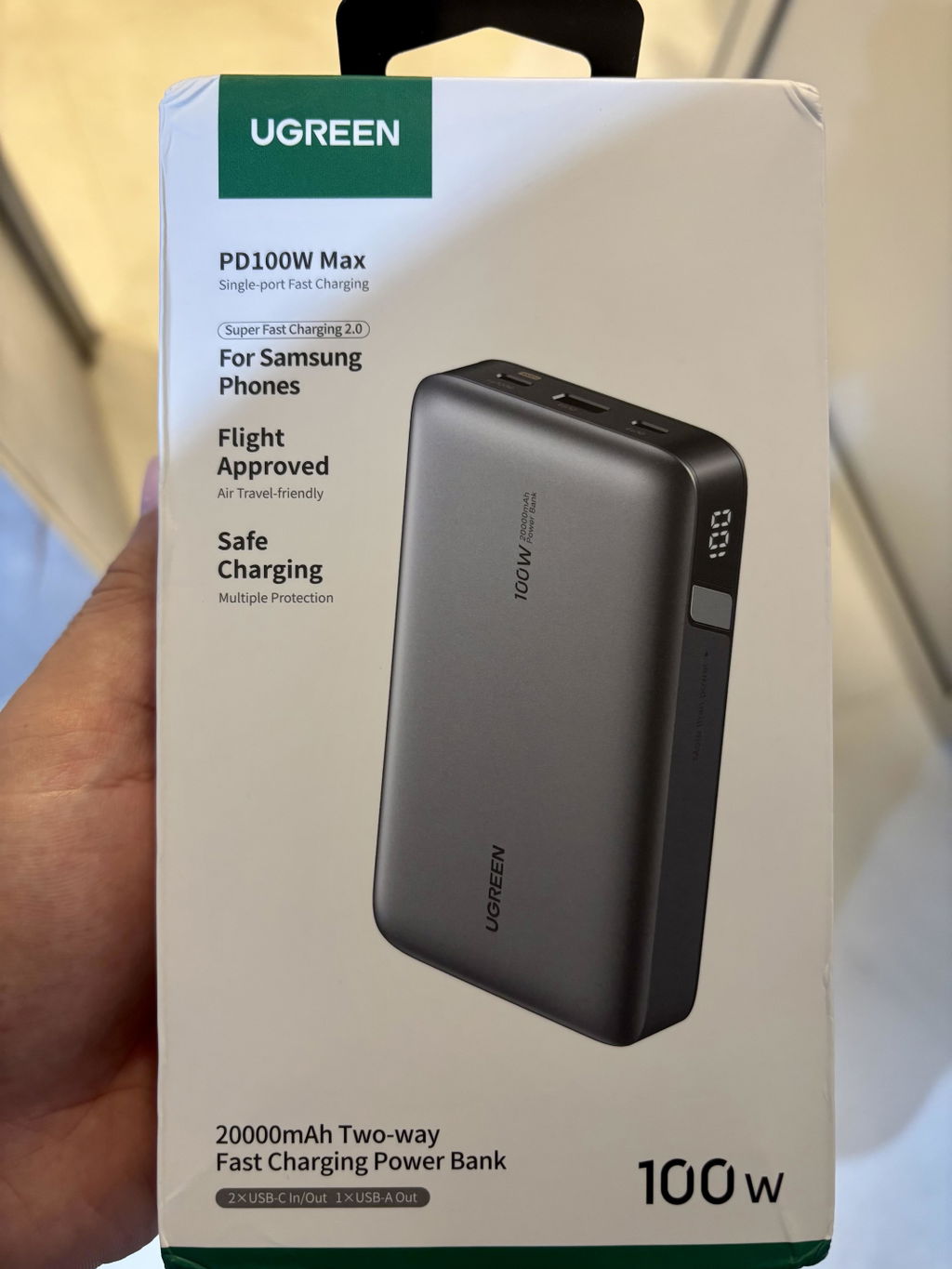
The UGREEN Nexode 100W 20000mAh Power Bank (PB205, 25188) charges a 16-inch MacBook Pro to 50% in 40 minutes and a phone about four and a half times, according to UGREEN. Three ports, a 65W fast recharge and a digital percentage display make it a dependable laptop power bank, and at 72Wh it is allowed in cabin baggage.

USB-C1 delivers up to 100W for laptops (MacBook Pro 16-inch to 50% in 40 minutes) and takes up to 65W to recharge (50% in about 45 minutes), in UGREEN's tests.

Charge a laptop, phone and earbuds together. Output is shared dynamically up to 100W total.

About 4.5 charges for an iPhone 15 Pro, 3.0 for a Galaxy S23 Ultra, 3.3 for a Nintendo Switch, 1.2 for a DJI Mavic Pro and 1.0 for a MacBook Air M2 15-inch (UGREEN figures).

Built with 21700-class cells in a V-0 rated flame-retardant housing, with multiple safety protections monitoring every charge.
Airports, trains and client sites: keep the laptop running without a socket.
| Runs | Approx. |
|---|---|
| MacBook Air M2 15-inch | ≈ 1.0 charge |
| MacBook Pro 16-inch, 40 min | ≈ 50% |
Use: Laptop on USB-C1 with the included 100W cable.

Phone, tablet and watch from a single power bank at home or in a hotel.
| Runs | Approx. |
|---|---|
| iPhone 15 Pro | ≈ 4.5 charges |
| Samsung Galaxy S23 Ultra | ≈ 3.0 charges |
Use: Tablet on USB-C1, phone on USB-C2, accessories on USB-A.

Outdoor shoots, trekking or long journeys with a drone or console.
| Runs | Approx. |
|---|---|
| Nintendo Switch | ≈ 3.3 charges |
| DJI Mavic Pro | ≈ 1.2 charges |
Use: Use USB-C for consoles and drone chargers.

Airline-friendly backup for international trips.
| Runs | Approx. |
|---|---|
| Flight cabin baggage | Allowed (72Wh) |
| Checked luggage | Not allowed |
Use: Carry in hand baggage and follow airline rules.
Charge counts and charging times are UGREEN's published test results. Real results vary by device, cable and how many devices share the output.
| Device | Status | What to expect |
|---|---|---|
| MacBook Pro 14/16-inch, MacBook Air | Compatible | Up to 100W on USB-C1 with a 5A cable (included) |
| USB-C Windows laptops (Dell, HP, Lenovo, ASUS) | Compatible | USB PD up to 100W |
| iPhone 15, 16 and 17 series | Compatible | USB-C PD fast charging |
| Samsung Galaxy and Android phones | Compatible | USB-C PD or USB-A up to 22.5W |
| iPad and Android tablets | Compatible | USB-C PD |
| Nintendo Switch, Steam Deck, drones | Compatible | USB-C charging |
| Laptops needing more than 100W | Partly | Charge more slowly |
| Barrel-pin laptops without USB-C | Not supported | Needs USB-C charging |
| Wireless (Qi) charging | Not supported | Not supported |
| Model | UGREEN Nexode PB205 (25188) |
|---|---|
| Capacity | 20,000mAh / 72Wh |
| USB-C1 | Up to 100W out, up to 65W in |
| USB-C2 | Up to 30W out |
| USB-A | Up to 22.5W out |
| Total output | Up to 100W, dynamically shared |
| Cells and housing | 21700-class cells, V-0 flame-retardant housing |
| Display | Digital percentage |
| Wireless charging | No |
| Size | 139 × 80 × 26.5mm |
| Weight | About 420g |
Wall charger not included. Use a 65W or higher USB-C PD charger on USB-C1 for the fastest recharge.
Per-port speed drops when several devices share the 100W total. For the fastest laptop charging, use USB-C1 alone with the included 5A cable.
Yes. USB-C1 delivers up to 100W; UGREEN's test charged a 16-inch MacBook Pro to 50% in 40 minutes with the included 100W cable.
About 4.5 times for an iPhone 15 Pro and about 3.0 for a Galaxy S23 Ultra, according to UGREEN.
Up to 65W through USB-C1; UGREEN measured 50% in about 45 minutes with a 65W charger.
Yes, through two USB-C ports and one USB-A port. The 100W total is shared, so each port may slow down.
Yes, in cabin baggage. It is rated at 72Wh, below the 100Wh limit. Never put it in checked luggage.
No. The rating is at the internal cell voltage; conversion and cable losses reduce what reaches your devices.
No. A 100W USB-C cable and user manual are included.
No. It charges through its USB-C and USB-A ports.
Genuine UGREEN, imported and sold by Sophus Technosol Pvt Ltd, the authorised national distributor. GST invoice with every order. 1-year India warranty on power banks.
The UGREEN Nexode 100W 20000mAh Power Bank (PB205, 25188) charges a 16-inch MacBook Pro to 50% in 40 minutes and a phone about four and a half times, according to UGREEN. Three ports, a 65W fast recharge and a digital percentage display make it a dependable laptop power bank, and at 72Wh it is allowed in cabin baggage.
USB-C1 delivers up to 100W for laptops (MacBook Pro 16-inch to 50% in 40 minutes) and takes up to 65W to recharge (50% in about 45 minutes), in UGREEN's tests.
Charge a laptop, phone and earbuds together. Output is shared dynamically up to 100W total.
About 4.5 charges for an iPhone 15 Pro, 3.0 for a Galaxy S23 Ultra, 3.3 for a Nintendo Switch, 1.2 for a DJI Mavic Pro and 1.0 for a MacBook Air M2 15-inch (UGREEN figures).
Built with 21700-class cells in a V-0 rated flame-retardant housing, with multiple safety protections monitoring every charge.
Airports, trains and client sites: keep the laptop running without a socket.
| Runs | Approx. |
|---|---|
| MacBook Air M2 15-inch | ≈ 1.0 charge |
| MacBook Pro 16-inch, 40 min | ≈ 50% |
Use: Laptop on USB-C1 with the included 100W cable.
Phone, tablet and watch from a single power bank at home or in a hotel.
| Runs | Approx. |
|---|---|
| iPhone 15 Pro | ≈ 4.5 charges |
| Samsung Galaxy S23 Ultra | ≈ 3.0 charges |
Use: Tablet on USB-C1, phone on USB-C2, accessories on USB-A.
Outdoor shoots, trekking or long journeys with a drone or console.
| Runs | Approx. |
|---|---|
| Nintendo Switch | ≈ 3.3 charges |
| DJI Mavic Pro | ≈ 1.2 charges |
Use: Use USB-C for consoles and drone chargers.
Airline-friendly backup for international trips.
| Runs | Approx. |
|---|---|
| Flight cabin baggage | Allowed (72Wh) |
| Checked luggage | Not allowed |
Use: Carry in hand baggage and follow airline rules.
Charge counts and charging times are UGREEN's published test results. Real results vary by device, cable and how many devices share the output.
| Device | Status | What to expect |
|---|---|---|
| MacBook Pro 14/16-inch, MacBook Air | Compatible | Up to 100W on USB-C1 with a 5A cable (included) |
| USB-C Windows laptops (Dell, HP, Lenovo, ASUS) | Compatible | USB PD up to 100W |
| iPhone 15, 16 and 17 series | Compatible | USB-C PD fast charging |
| Samsung Galaxy and Android phones | Compatible | USB-C PD or USB-A up to 22.5W |
| iPad and Android tablets | Compatible | USB-C PD |
| Nintendo Switch, Steam Deck, drones | Compatible | USB-C charging |
| Laptops needing more than 100W | Partly | Charge more slowly |
| Barrel-pin laptops without USB-C | Not supported | Needs USB-C charging |
| Wireless (Qi) charging | Not supported | Not supported |
| Model | UGREEN Nexode PB205 (25188) |
|---|---|
| Capacity | 20,000mAh / 72Wh |
| USB-C1 | Up to 100W out, up to 65W in |
| USB-C2 | Up to 30W out |
| USB-A | Up to 22.5W out |
| Total output | Up to 100W, dynamically shared |
| Cells and housing | 21700-class cells, V-0 flame-retardant housing |
| Display | Digital percentage |
| Wireless charging | No |
| Size | 139 × 80 × 26.5mm |
| Weight | About 420g |
Wall charger not included. Use a 65W or higher USB-C PD charger on USB-C1 for the fastest recharge.
Per-port speed drops when several devices share the 100W total. For the fastest laptop charging, use USB-C1 alone with the included 5A cable.
Yes. USB-C1 delivers up to 100W; UGREEN's test charged a 16-inch MacBook Pro to 50% in 40 minutes with the included 100W cable.
About 4.5 times for an iPhone 15 Pro and about 3.0 for a Galaxy S23 Ultra, according to UGREEN.
Up to 65W through USB-C1; UGREEN measured 50% in about 45 minutes with a 65W charger.
Yes, through two USB-C ports and one USB-A port. The 100W total is shared, so each port may slow down.
Yes, in cabin baggage. It is rated at 72Wh, below the 100Wh limit. Never put it in checked luggage.
No. The rating is at the internal cell voltage; conversion and cable losses reduce what reaches your devices.
No. A 100W USB-C cable and user manual are included.
No. It charges through its USB-C and USB-A ports.
Genuine UGREEN, imported and sold by Sophus Technosol Pvt Ltd, the authorised national distributor. GST invoice with every order. 1-year India warranty on power banks.
Country of Origin: China
Manufactured by: UGREEN Group Limited
Imported & Marketed by: Sophus Technosol Private Limited, Durga Complex, 2nd Floor, #38/1, 3rd Cross, Sahakarnagar G Block, Bengaluru – 560092, Karnataka, India
Customer care: +91 94038 93363 (phone / WhatsApp) · info@ugreenindia.com · Mon–Sat, 10:30–18:00 IST
GST Invoice available, just mail back with details to order confirmation mail.
GST Invoice, Warranty, authenticity, faster support
Good quality product! Happy with the timely delivery. It’s been a week only. Trust in the long term it’s performance would be good and that it would deliver as promised. Thanks!
The product met the exact expectation. I am converting to 19v dc to power my laptop directly. The Ugreen power bank was suggested to me by ChatGPT.
Nice

USB-C1 supports up to 100W output and 65W input, USB-C2 supports up to 30W output, and USB-A supports up to 22.5W output; the system total is up to 100W with dynamic power sharing. Port-nameplate figures are conditional single-port or total maximums; actual power is negotiated and can be redistributed when more than one device is connected.
The defining functions of this SKU are separated from headline marketing so connector roles, power, data, length and battery limits remain clear.
Headline watts and gigabits are negotiated maximums, not universal results. Plan around every device, port, cable, charger, battery state and protocol in the path.
Reaching 100W from USB-C1 requires a device that requests the matching USB PD profile and a 5A electronically marked USB-C cable. The included official 100W cable is intended for this role.
USB-C1 can recharge the power bank at up to 65W with a compatible 65W-or-higher USB-C PD charger and capable cable. The wall charger is separate.
When multiple outputs are active, the controller can reallocate the available total. A device may briefly reconnect or renegotiate when another cable is inserted; connect the most power-hungry device to the highest-rated port first.
Advertised phone or laptop recharge counts are controlled examples, not guarantees. Device battery size, starting level, screen use, radio activity, temperature, protocol and conversion efficiency all change the result.
Charging normally tapers as the receiving battery fills. A lower displayed rate near full charge does not by itself indicate a fault.
These practical examples keep the connector direction, supported protocol and safety limits in view.
Compatible laptop support. Use USB-C1 for a USB-C laptop that accepts up to 100W, with the included 100W cable and enough battery remaining.
Phone and tablet kit. Use USB-C2 or USB-A for smaller devices while reserving USB-C1 for the highest-priority load.
Multi-device workday. Connect up to three compatible devices and expect power to be redistributed within the 100W total.
Carry-on travel planning. The 72Wh rating is the number used for transport checks. Keep the rating readable, protect the terminals and confirm carrier rules before a flight.
Use this sequence for a controlled first connection. Follow the connected-device maker’s stricter instruction whenever it differs.
A connector that fits is only the first check. The host, accessory, operating system and power source must support the requested function.
These are the supported functions of this product when the complete connection is compatible.
These exclusions distinguish this SKU from visually similar cables, chargers, hubs, audio products and power stations.
Choose by function: If the required task appears in this exclusion list, select a purpose-built cable, charger, adapter or power product with the needed interface and rating.
These habits support reliable charging, data, audio and battery use while reducing avoidable connector strain.
Avoid these common mistakes even when the plug appears to fit.
Review these electrical, thermal, transport and physical limits before connecting valuable equipment.
Stop and recheck: Disconnect power if a connection becomes loose, wet, damaged, swollen, unstable or unusually hot. Never keep reconnecting equipment that shows a safety warning.
Confirm connector direction, required protocol, power profile, cable length and package needs before choosing by appearance.
Disconnect power before inspection and change one variable at a time when diagnosing a connection.
Model specifications are consolidated below. Maximum values remain conditional on the complete negotiated connection.
Only components supported by the model record or an official model package list are included here. Scene devices and props are excluded.
20,000mAh nominal, corresponding to 72Wh. Usable delivered energy is lower after conversion and safety reserves.
100W maximum through USB-C1 and up to 100W total. It is conditional on the correct port, compatible device, cable and current power-sharing state.
Yes, through USB-C1, for laptops that accept standard USB PD at 100W or less. A 5A E-marked cable is required, and higher-power or proprietary systems may charge slowly.
Yes, using its two USB-C ports and one USB-A port; the total is shared and per-port speed can reduce when several outputs are active.
Its 72Wh rating is below 100Wh. Current IATA power-bank guidance says carry-on only, a maximum of two power banks of 100Wh or less, and permits stricter airline policy. Check the carrier before travel.
No. Power banks are spare lithium batteries and must not be placed in checked baggage.
No. The nominal mAh is measured at internal cell voltage; conversion to 5V or higher, cable loss, temperature and safety reserve reduce usable output.
No. this product charges through its USB outputs.
Do not rely on it as a UPS. Continuous pass-through operation is not here and can add heat and battery cycling.
No wall charger is included in the official package list. A compatible 65W-or-higher USB-C PD charger is needed to reach the maximum recharge input.
The connected device requests its supported profile, charging tapers near full, heat can reduce power and simultaneous outputs share the total.
Disconnect it if safe, move it away from combustible materials without puncturing it, stop use and contact an authorised battery service. Do not ship or discard it casually.