

Backup and portable storage
Carry projects between work and home, or back up your laptop.
| You get | Result |
|---|---|
| Speed | Up to 5Gbps |
| Drives | 2.5-inch SATA HDDs and SSDs, 7mm and 9.5mm |
| Driver | None |
Use: Plug in, and the drive appears like a USB stick.





UGREEN 30848 2.5-Inch SATA Enclosure, 5Gbps USB-A

The UGREEN 2.5-Inch SATA Hard Drive Enclosure (30848) turns a 2.5-inch SATA hard drive or SSD into fast, portable external storage over USB-A 3.0 (detachable cable), at up to 5Gbps. Use it to reuse an old laptop drive, back up photos and work files, clone a drive before an upgrade, or carry big projects between computers.

Move large files quickly with UASP.

Fit the drive in seconds without screwdrivers.

Protects your drive and data.
Carry projects between work and home, or back up your laptop.
| You get | Result |
|---|---|
| Speed | Up to 5Gbps |
| Drives | 2.5-inch SATA HDDs and SSDs, 7mm and 9.5mm |
| Driver | None |
Use: Plug in, and the drive appears like a USB stick.
| Device | Status | What to expect |
|---|---|---|
| 2.5-inch SATA HDDs and SSDs, 7mm and 9.5mm | Compatible | Supported |
| Windows, macOS, Linux, Android (OTG) | Compatible | Plug and play |
| USB 2.0 ports | Partly | Slower speed |
| 3.5-inch drives, M.2 and IDE drives | Not supported | Not supported |
| Model | UGREEN 30848 |
|---|---|
| Supports | 2.5-inch SATA HDDs and SSDs, 7mm and 9.5mm |
| Interface | USB-A 3.0 (detachable cable) |
| Speed | Up to 5Gbps |
| Controller | ASM1153 |
| Max capacity | 6TB |
| Features | UASP |
SSD/HDD not included.
A new drive must be initialised and formatted before it appears in File Explorer or Finder.
For full 5Gbps, use a matching port on your computer.
2.5-inch SATA HDDs and SSDs, 7mm and 9.5mm.
No.
Initialise and format it in Disk Management (Windows) or Disk Utility (Mac).
No.
No.
Genuine UGREEN, imported and sold by Sophus Technosol Pvt Ltd, the authorised national distributor. GST invoice with every order. 2-year India warranty.
The UGREEN 2.5-Inch SATA Hard Drive Enclosure (30848) turns a 2.5-inch SATA hard drive or SSD into fast, portable external storage over USB-A 3.0 (detachable cable), at up to 5Gbps. Use it to reuse an old laptop drive, back up photos and work files, clone a drive before an upgrade, or carry big projects between computers.
Move large files quickly with UASP.
Fit the drive in seconds without screwdrivers.
Protects your drive and data.
Carry projects between work and home, or back up your laptop.
| You get | Result |
|---|---|
| Speed | Up to 5Gbps |
| Drives | 2.5-inch SATA HDDs and SSDs, 7mm and 9.5mm |
| Driver | None |
Use: Plug in, and the drive appears like a USB stick.
| Device | Status | What to expect |
|---|---|---|
| 2.5-inch SATA HDDs and SSDs, 7mm and 9.5mm | Compatible | Supported |
| Windows, macOS, Linux, Android (OTG) | Compatible | Plug and play |
| USB 2.0 ports | Partly | Slower speed |
| 3.5-inch drives, M.2 and IDE drives | Not supported | Not supported |
| Model | UGREEN 30848 |
|---|---|
| Supports | 2.5-inch SATA HDDs and SSDs, 7mm and 9.5mm |
| Interface | USB-A 3.0 (detachable cable) |
| Speed | Up to 5Gbps |
| Controller | ASM1153 |
| Max capacity | 6TB |
| Features | UASP |
SSD/HDD not included.
A new drive must be initialised and formatted before it appears in File Explorer or Finder.
For full 5Gbps, use a matching port on your computer.
2.5-inch SATA HDDs and SSDs, 7mm and 9.5mm.
No.
Initialise and format it in Disk Management (Windows) or Disk Utility (Mac).
No.
No.
Genuine UGREEN, imported and sold by Sophus Technosol Pvt Ltd, the authorised national distributor. GST invoice with every order. 2-year India warranty.
Country of Origin: China
Manufactured by: UGREEN Group Limited
Imported & Marketed by: Sophus Technosol Private Limited, Durga Complex, 2nd Floor, #38/1, 3rd Cross, Sahakarnagar G Block, Bengaluru – 560092, Karnataka, India
Customer care: +91 94038 93363 (phone / WhatsApp) · info@ugreenindia.com · Mon–Sat, 10:30–18:00 IST
GST Invoice available, just mail back with details to order confirmation mail.
GST Invoice, Warranty, authenticity, faster support
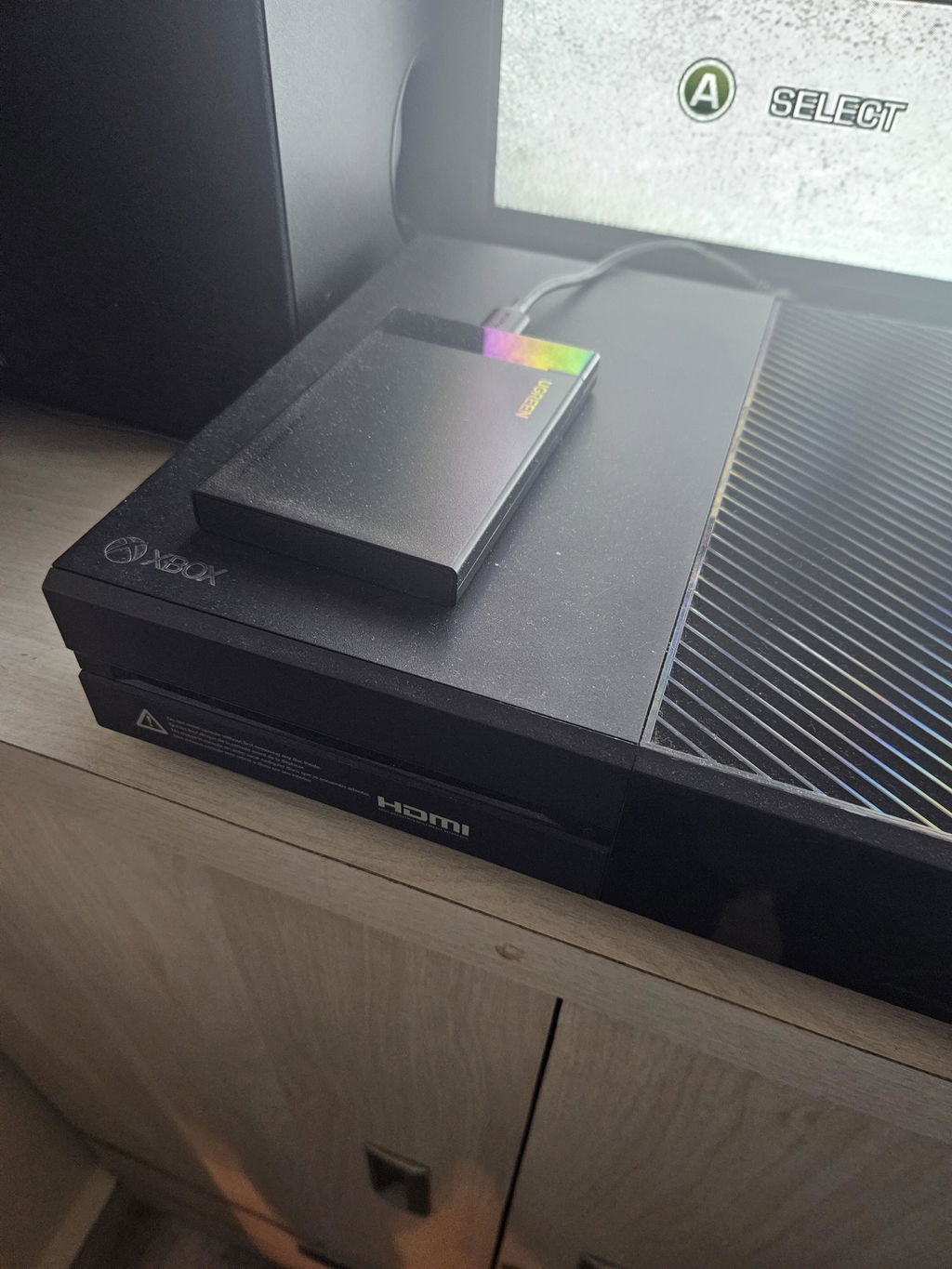
Simply perfect. Got this for my Xbox One as all other enclosures refused to detect my hard disk. This one worked like a charm on the first go and the tool-less installation was the cherry on top. Transferred my entire game library from internal to this of about 200GB in just under 20 minutes with a constant speed of 110Mbps

UGREEN 30848 houses one 7mm or 9.5mm 2.5-inch SATA HDD or SSD and connects it to a USB-A host through a detachable cable. The guide below separates drive protocol, physical size, host link and real-world limits so buyers can choose safely without confusing SATA, M.2 and NVMe.
Storage role. houses one 7mm or 9.5mm 2.5-inch SATA HDD or SSD and connects it to a USB-A host through a detachable cable.
Supported drive. 2.5-inch SATA I/II/III HDD or SSD, 7mm or 9.5mm high.
Connection path. Detachable 30cm USB 3.0 Micro-B to USB-A cable; internal SATA III, 7+15-pin.
Thermal and controller design. Black plastic enclosure with internal EVA pads; ASM1153E on current official UGREEN product material.
1. The drive. 2.5-inch SATA I/II/III HDD or SSD, 7mm or 9.5mm high.
2. Internal bus. SATA III, 7+15-pin. This is the protocol used between the installed drive and bridge.
3. Enclosure bridge. ASM1153E on current official UGREEN product material. The bridge translates the drive protocol to USB mass storage.
4. Host connection. Detachable 30cm USB 3.0 Micro-B to USB-A cable. The host port, cable and any hub must support the required data mode.
Do not shop by shape alone: not for 3.5-inch, M.2 SATA, M.2 NVMe, mSATA or IDE/PATA drives. An M.2 notch does not by itself identify SATA versus NVMe, and a USB-C connector does not guarantee USB4 or 10Gbps.
Compatible: 2.5-inch SATA I/II/III HDD or SSD, 7mm or 9.5mm high.
Not compatible: not for 3.5-inch, M.2 SATA, M.2 NVMe, mSATA or IDE/PATA drives.
Capacity guidance: Up to 6TB on the India handle and live gallery; some newer regional tables conflict, so 6TB is the conservative model-specific limit used here.
Brand examples are not enough: the same SSD brand can sell SATA and NVMe products under similar names. Check this model’s protocol, dimensions, key and any pre-installed heatsink before purchase.
The enclosure’s USB link is rated up to 5Gbps while SATA III is a 6Gbps internal bus. The lower USB ceiling governs; actual throughput is lower and depends on media, host, workload and UASP support.
Portable SATA SSD. Turn a spare 2.5-inch SATA SSD into compact external storage for documents and project files.
Old laptop drive reuse. Give a healthy 7mm or 9.5mm laptop SATA HDD/SSD a second role after checking for encryption and file-system compatibility.
Console or router storage. Use only if that host supports USB mass storage, the drive capacity and the required format; reformatting can erase existing data.
Backups and archives. Build a scheduled backup target, then keep a second independent copy. An enclosure is storage hardware, not a complete backup strategy.
Drive inspection. Read a removed drive on another computer when the drive is electrically healthy, unlocked and formatted in a file system the host understands.
Critical distinction: “Not visible in File Explorer/Finder” does not automatically mean hardware failure. A blank, offline, encrypted, unsupported or unmounted disk can appear only in the system disk utility.
Before migration. Back up irreplaceable files separately. Record encryption/recovery keys and confirm source and target health before changing partitions.
Cloning is software-driven. This enclosure exposes one drive; it has no standalone clone button. Use trusted software and verify the copy before erasing the original.
Booting is not guaranteed. External boot depends on the computer firmware, operating system, security policy, partition scheme and licensing—not just the enclosure.
Recovery has limits. An enclosure cannot repair failed heads, damaged NAND, controller faults, corrupted encryption or severe file-system damage. Repeated retries can worsen a failing drive.
Listed/class: Windows, macOS, Linux and ChromeOS; live media illustrates PC, router, PS4 and TV use subject to each device’s supported file system and capacity.
Computers. Most modern systems support USB mass storage, but file-system write support differs across Windows, macOS and Linux.
Phones and tablets. A matching connector is insufficient: the mobile host must support USB OTG/mass storage, the chosen file system and the enclosure’s power demand.
TVs, routers and consoles. Check the device manual for USB generation, file system, partition table, maximum capacity and whether formatting is mandatory.
Hubs and adapters. An extra hub or converter can reduce speed or power stability. Test directly on the host before diagnosing the enclosure.
Verify the drive. Read the drive label/data sheet for protocol, physical size, key and thickness before opening the enclosure.
Use the supplied path. Start with Detachable 30cm USB 3.0 Micro-B to USB-A cable. Connect directly to a known-good host data port.
Protect the thermal path. Install pads as directed, keep vents clear and allow airflow during sustained transfers.
Eject and keep backups. Safely remove before unplugging and maintain at least one independent copy of important data.
Do not force connectors. Misaligned SATA or M.2 connectors can be damaged by surprisingly little force. Recheck orientation and protocol.
Do not format blindly. If a host asks to initialise or erase an existing drive, stop until you know why and have a backup.
Do not unplug during activity. Removing USB or power during writes can corrupt files, file systems or the drive translation layer.
Do not block cooling. Do not wrap, stack or operate on soft insulating surfaces during sustained transfer.
Data first: an enclosure can expose a drive; it cannot guarantee the integrity of the data already on it. Keep independent backups before migration, repartitioning or firmware work.
Power: bus power depends on the host. If detection resets under load, remove unpowered hubs and use the supplied cable on a stronger direct port.
Heat: warmth can be normal, especially with NVMe. Stop use for smoke, burning smell, deformation, liquid ingress, repeated drop-outs or abnormal mechanical HDD sounds.
Handling: protect bare drives from electrostatic discharge; hold an SSD by its edges, avoid touching gold contacts and never move a spinning 3.5-inch HDD roughly.
Removal: wait for all writes, eject in the OS, allow the activity indicator to settle, then disconnect. Auto-sleep is not a substitute for safe removal.
No device at all. Disconnect, power down, reseat the drive and retest with the supplied cable directly on another known-good host data port. Verify the drive protocol and orientation.
Enclosure detected, no volume. Open Disk Management/Disk Utility. A new disk may need initialisation; an old disk may be offline, encrypted or use an unsupported file system. Do not erase valuable data.
Slower than expected. Confirm negotiated USB mode, remove slow hubs, use the supplied cable, test a large file and check SSD/HDD health, cache and temperature. Link rate is not file speed.
Disconnects under load. Check cable seating, direct-port power, thermal-pad placement and airflow. For SKU 50422, use the supplied 12V/2A adapter. Stop if the drive reports health errors.
Read-only or permission errors. Check write protection, ownership, encryption and file-system support. macOS and Windows do not natively write every file system used by the other.
Console/TV asks to format. That host may require its own partition and file system. Formatting erases the drive; move needed data elsewhere first and review the host manual.
1 × UGREEN 30848 enclosure, 1 × 30cm USB 3.0 Micro-B-to-USB-A cable; SSD/HDD is not included
No host computer, phone, tablet, console, TV, router, SSD/HDD, cloning software or data-recovery service is included unless explicitly named above.