Home, office and travel
One charger in the laptop bag for every location.
| Runs | Approx. |
|---|---|
| Laptop alone on C1/C2 | Up to 100W |
| Devices at once | Up to 4 |
Use: Laptop on USB-C1 or USB-C2.



GaN II with an India plug, charges up to four devices


UGREEN Nexode 100W 4-Port GaN Charger

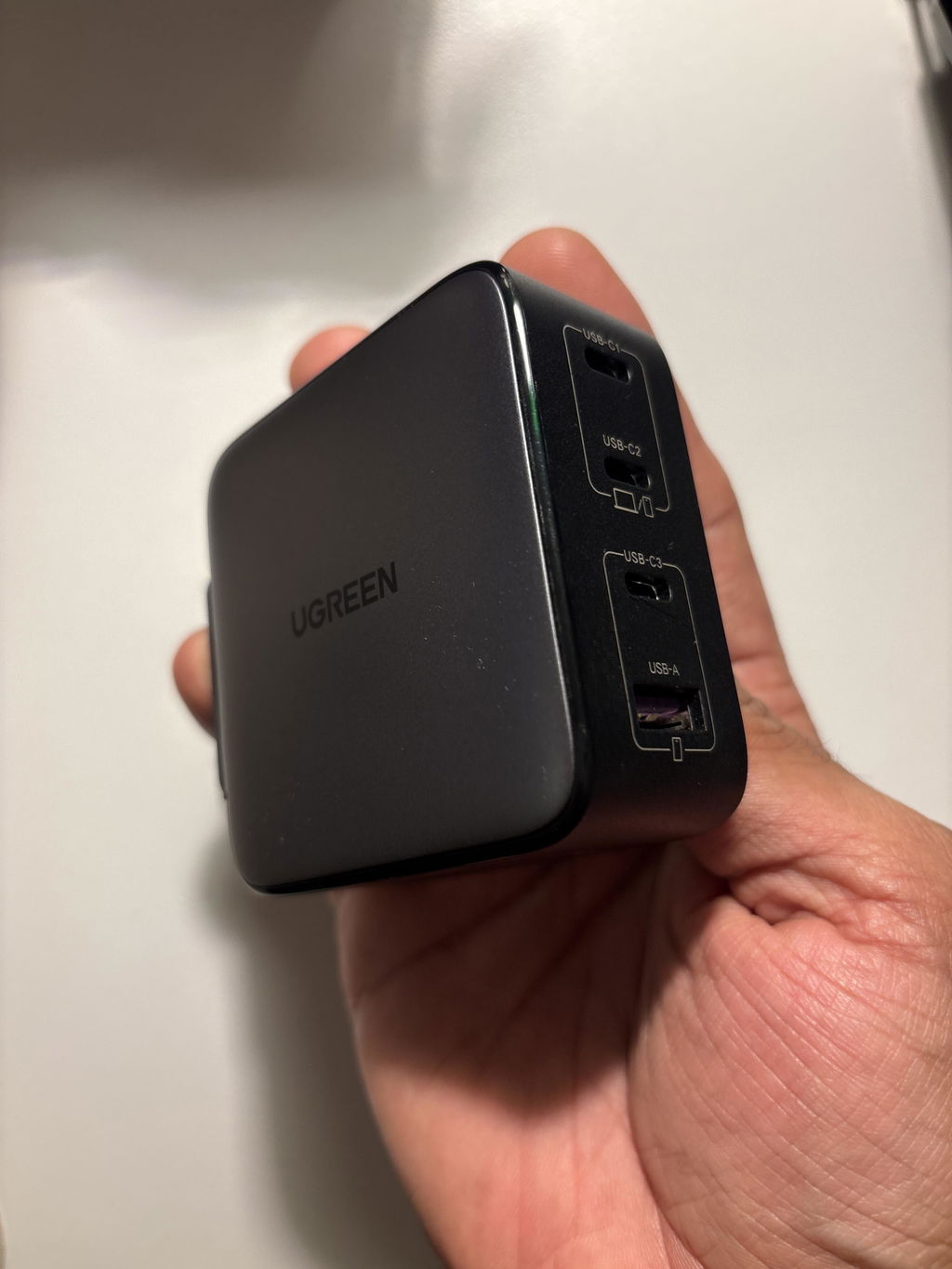
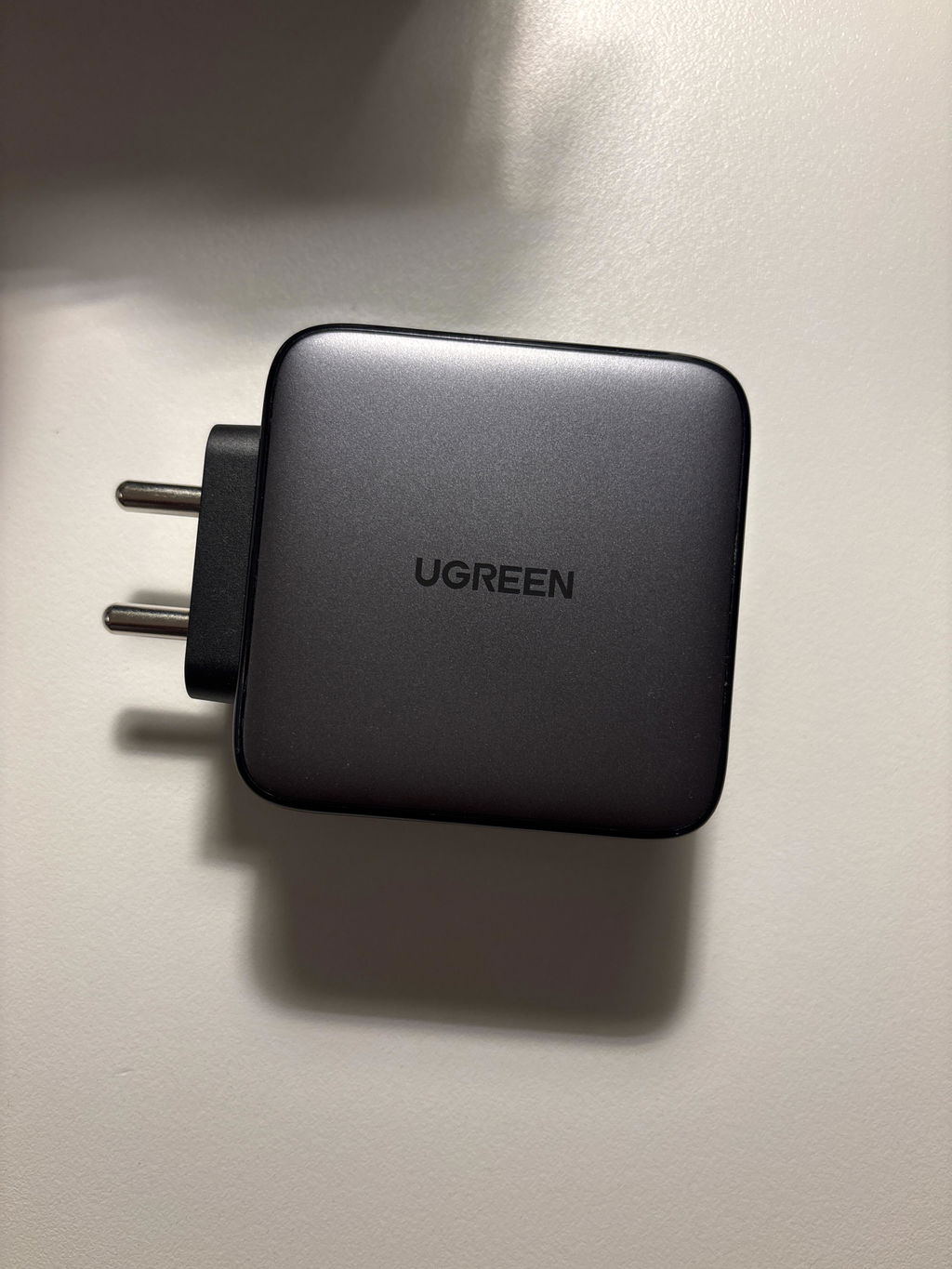
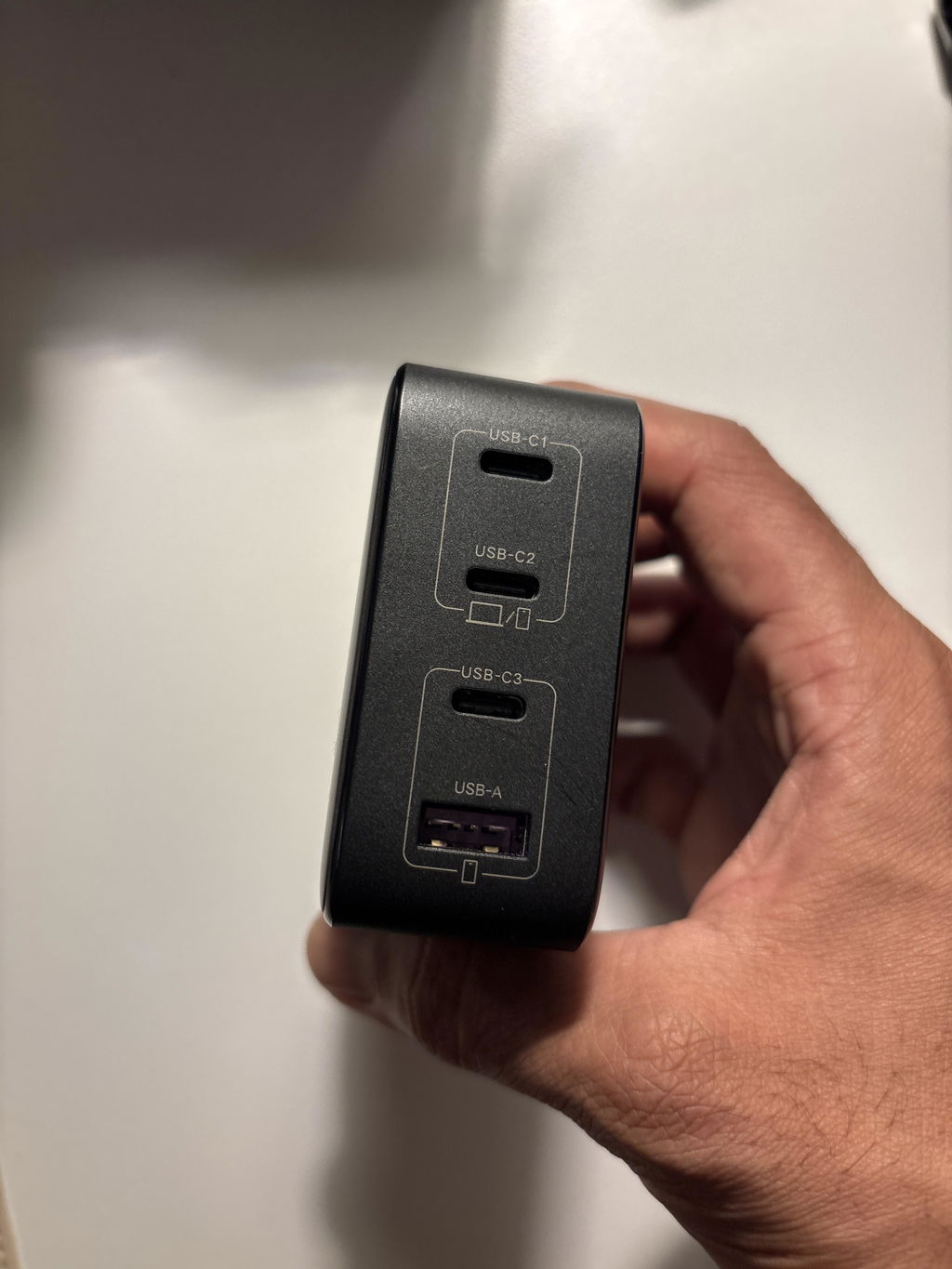
The UGREEN Nexode CD226 100W Charger (15254) has a fixed India plug and BIS certification, so it goes straight into an Indian socket without an adapter. USB-C1 or USB-C2 delivers up to 100W to a laptop, while USB-C3 and USB-A charge phones and accessories, four devices from one GaN II charger.

USB-C1 or USB-C2 gives up to 100W on its own, enough for 16-inch class laptops that accept 100W over USB-C.

Laptop, tablet, phone and earbuds from one plug, with the 100W shared intelligently.

The two high-power USB-C ports can charge two MacBook Air laptops at the same time.

GaN II improves efficiency and Thermal Guard monitors temperature continuously.
One charger in the laptop bag for every location.
| Runs | Approx. |
|---|---|
| Laptop alone on C1/C2 | Up to 100W |
| Devices at once | Up to 4 |
Use: Laptop on USB-C1 or USB-C2.

Share one charger between two MacBook Air laptops.
| Runs | Approx. |
|---|---|
| Two laptops | Shared 100W |
| Cable | USB-C, 5A for 100W |
Use: One laptop on USB-C1, one on USB-C2.

Phones, tablets, earbuds and consoles.
| Runs | Approx. |
|---|---|
| USB-C3 | Up to 22.5W |
| USB-A | Up to 22.5W |
Use: Phones and accessories on USB-C3 and USB-A.
| Device | Status | What to expect |
|---|---|---|
| MacBook Pro, MacBook Air | Compatible | Up to 100W on USB-C1/C2 with a 5A cable |
| USB-C Windows laptops | Compatible | USB PD up to 100W |
| iPhone 15, 16 and 17 series | Compatible | USB-C PD |
| Samsung Galaxy (PPS) | Compatible | PPS on USB-C1/C2 |
| iPad and tablets | Compatible | USB-C PD |
| Steam Deck, Switch, power banks | Compatible | USB-C PD within listed profiles |
| Two laptops at 100W each | Not supported | 100W is shared |
| Barrel-pin laptops | Not supported | Needs USB-C charging |
| Model | UGREEN Nexode CD226 (15254) |
|---|---|
| AC input | 100–240V~ 50/60Hz, 2.3A max |
| Total output | 100W shared |
| Ports | 3 × USB-C, 1 × USB-A |
| USB-C1 / USB-C2 | Up to 100W alone (20V/5A); PPS 3.3–21V/3A |
| USB-C3 | Up to 22.5W |
| USB-A | Up to 22.5W |
| Protocols | PD 3.0/2.0, QC 4+/4.0/3.0, PPS, AFC, SCP, FCP, Apple 2.4A, BC1.2 |
| Plug | Fixed India plug |
| Certification | BIS |
| Housing | Flame-retardant polycarbonate |
| Size | About 7.6 × 6.9 × 3.3cm |
| Weight | About 310g |
No cable is listed as included. Use a 5A e-marked USB-C cable for 100W laptop charging.
USB-C1 and USB-C2 each reach 100W only when used alone; together the charger shares its 100W.
Yes. USB-C1 or USB-C2 gives up to 100W alone with a compatible laptop and a 5A e-marked cable.
Yes, a fixed India plug, and it is BIS certified.
No. The 100W is shared.
Up to 22.5W, for phones and accessories.
Yes, sharing 100W; UGREEN shows two MacBook Air laptops fast-charging together.
No cable is listed as included.
Genuine UGREEN, imported and sold by Sophus Technosol Pvt Ltd, the authorised national distributor. GST invoice with every order. 1-year India warranty on chargers.
The UGREEN Nexode CD226 100W Charger (15254) has a fixed India plug and BIS certification, so it goes straight into an Indian socket without an adapter. USB-C1 or USB-C2 delivers up to 100W to a laptop, while USB-C3 and USB-A charge phones and accessories, four devices from one GaN II charger.
USB-C1 or USB-C2 gives up to 100W on its own, enough for 16-inch class laptops that accept 100W over USB-C.
Laptop, tablet, phone and earbuds from one plug, with the 100W shared intelligently.
The two high-power USB-C ports can charge two MacBook Air laptops at the same time.
GaN II improves efficiency and Thermal Guard monitors temperature continuously.
One charger in the laptop bag for every location.
| Runs | Approx. |
|---|---|
| Laptop alone on C1/C2 | Up to 100W |
| Devices at once | Up to 4 |
Use: Laptop on USB-C1 or USB-C2.
Share one charger between two MacBook Air laptops.
| Runs | Approx. |
|---|---|
| Two laptops | Shared 100W |
| Cable | USB-C, 5A for 100W |
Use: One laptop on USB-C1, one on USB-C2.
Phones, tablets, earbuds and consoles.
| Runs | Approx. |
|---|---|
| USB-C3 | Up to 22.5W |
| USB-A | Up to 22.5W |
Use: Phones and accessories on USB-C3 and USB-A.
| Device | Status | What to expect |
|---|---|---|
| MacBook Pro, MacBook Air | Compatible | Up to 100W on USB-C1/C2 with a 5A cable |
| USB-C Windows laptops | Compatible | USB PD up to 100W |
| iPhone 15, 16 and 17 series | Compatible | USB-C PD |
| Samsung Galaxy (PPS) | Compatible | PPS on USB-C1/C2 |
| iPad and tablets | Compatible | USB-C PD |
| Steam Deck, Switch, power banks | Compatible | USB-C PD within listed profiles |
| Two laptops at 100W each | Not supported | 100W is shared |
| Barrel-pin laptops | Not supported | Needs USB-C charging |
| Model | UGREEN Nexode CD226 (15254) |
|---|---|
| AC input | 100–240V~ 50/60Hz, 2.3A max |
| Total output | 100W shared |
| Ports | 3 × USB-C, 1 × USB-A |
| USB-C1 / USB-C2 | Up to 100W alone (20V/5A); PPS 3.3–21V/3A |
| USB-C3 | Up to 22.5W |
| USB-A | Up to 22.5W |
| Protocols | PD 3.0/2.0, QC 4+/4.0/3.0, PPS, AFC, SCP, FCP, Apple 2.4A, BC1.2 |
| Plug | Fixed India plug |
| Certification | BIS |
| Housing | Flame-retardant polycarbonate |
| Size | About 7.6 × 6.9 × 3.3cm |
| Weight | About 310g |
No cable is listed as included. Use a 5A e-marked USB-C cable for 100W laptop charging.
USB-C1 and USB-C2 each reach 100W only when used alone; together the charger shares its 100W.
Yes. USB-C1 or USB-C2 gives up to 100W alone with a compatible laptop and a 5A e-marked cable.
Yes, a fixed India plug, and it is BIS certified.
No. The 100W is shared.
Up to 22.5W, for phones and accessories.
Yes, sharing 100W; UGREEN shows two MacBook Air laptops fast-charging together.
No cable is listed as included.
Genuine UGREEN, imported and sold by Sophus Technosol Pvt Ltd, the authorised national distributor. GST invoice with every order. 1-year India warranty on chargers.
Country of Origin: China
Manufactured by: UGREEN Group Limited
Imported & Marketed by: Sophus Technosol Private Limited, Durga Complex, 2nd Floor, #38/1, 3rd Cross, Sahakarnagar G Block, Bengaluru – 560092, Karnataka, India
Customer care: +91 94038 93363 (phone / WhatsApp) · info@ugreenindia.com · Mon–Sat, 10:30–18:00 IST
GST Invoice available, just mail back with details to order confirmation mail.
GST Invoice, Warranty, authenticity, faster support
Excellent quality.
UGREEN Nexode 100W USB-C Charger is more compact and has great finish compared to my Samsung galaxy book 4 pro 360 charger. I have used the charger for 4 use cases over past few weeks and found it provide 100 percent satisfaction in each. Charges my galaxy book 4 pro faster than 1ooW original brick charger. It fast charges my S24 ultra mobile, It also charges my old HP Envy laptop with Ugreen HP adaptor. I also charge my smartwatch. For all use cases the Ugreen charges does not seem to get hot and provides consistent and relable performance. It comes with 2 years warranty giving me peace of mind.
Good For Asus VivoBook S 14/15
Feels premium ,ideal for travel
The best adaptor

A precise buying guide for the fixed India-plug model—not a specification blend from similarly named Nexode chargers.
Maximum single-port charging
For the highest available output, connect one compatible USB-C PD laptop or other high-power device to USB-C1 or USB-C2 and leave the remaining ports unused. The receiving device requests a supported profile; the charger never forces 100W into equipment that accepts less.
Not a 100W PPS promise: The manual lists a 100W fixed profile at 20V/5A, while the stated PPS range for C1/C2 is 3.3–21V/3A. Match the device requirement to the actual listed profile.
One budget, four sockets
All four ports may be occupied, but the charger has one 100W maximum total. As more devices request power, the internal controller reallocates the budget. The result changes with the active port combination and each device’s requested voltage and current.
Do not add the labels together: 100W + 100W + 22.5W + 22.5W is not available simultaneously. Those numbers are individual port ceilings under the stated conditions, while the charger itself remains limited to 100W total.
Real-world expectations
Two laptops can have different results even when they appear similar. One may request 20V PD while another reduces input because of battery state, thermal conditions or its manufacturer’s charging policy. Cable capability also matters: a 3A cable cannot provide a 5A path.
Physical format
UGREEN India lists approximate dimensions of 7.6 × 6.9 × 3.3cm and a weight of about 310g. The fixed India plug avoids a separate mains cable, but the body is still a high-power 100W adapter and may be too heavy for a worn or loose socket.
Travel clarification: The 100–240V input supports many mains systems, but a safe, correctly rated plug adapter may still be required outside India. A shape adapter does not change local electrical rules.
GaN II and temperature management
GaN II technology allows a smaller high-power conversion stage, and the gallery presents Thermal Guard monitoring. Some warmth is normal when converting substantial AC power in a compact enclosure, especially with several devices connected.
Safe interpretation: Thermal monitoring is a protective feature, not permission to block ventilation or continue using damaged equipment.
Electrical safeguards
The gallery identifies overvoltage, overheating, overcurrent and short-circuit protection. These circuits work alongside the connected device’s charging controller and the cable’s rating.
Never test a protection feature deliberately: Do not short ports, overload extension boards, defeat grounding where required or use the charger in wet locations.
Where it fits
The charger is most useful when one wall outlet must cover a changing mix of USB-C and USB-A charging needs.
Single-laptop desk. Give one compatible laptop priority on C1 or C2, adding other devices only when reduced laptop input is acceptable.
Office charging point. Keep USB-C and USB-A cables ready for a laptop, phone, headset and other work accessories.
Family device mix. Charge several lower-power devices while recognising that proprietary fast-charge modes depend on a compatible cable and profile.
Travel kit consolidation. Replace several adapters when the destination socket and plug-adapter arrangement are safe and properly rated.
From socket to charging
Troubleshooting order: Test one device at a time on C1 or C2, then substitute a known-good rated cable, then add other devices individually. This separates charger allocation from a cable or device limitation.
Clear product boundaries
Reliable-use checklist
Read before connecting
Stop-use signs: Unplug immediately if pins are bent, the casing cracks, the unit smells burnt, liquid enters a port, sparks occur outside normal plug contact, or charging repeatedly cycles with known-good equipment.
At a glance
The port roles and boundaries that matter most before purchase.
Up to 100W when used alone with a compatible USB-C PD device and a correctly rated 5A e-marked cable.
The same single-port fixed-voltage ceiling as C1; both ports share one charger budget and cannot each deliver 100W together.
Up to 22.5W with fixed and PPS profiles suited to compatible phones, tablets and accessories.
Up to 22.5W for compatible legacy cables and devices using the supported voltage and fast-charge profile.
A compact four-port form with UGREEN Thermal Guard monitoring and intelligent allocation.
The four sockets supply power; they do not transfer files, drive a monitor or turn the charger into a USB hub.
Included items
Yes, USB-C1 or USB-C2 can provide up to 100W when used alone with a compatible USB-C PD laptop and a 5A e-marked cable. The laptop may accept less.
No. The charger has one shared 100W total. Each high-power port reaches its 100W ceiling only under the specified single-port condition.
USB-C3 is specified up to 22.5W. It is a lower-power phone and accessory port, not a second 100W laptop supply.
The USB-A ceiling is 22.5W using a compatible voltage and charging profile. The connected device and cable determine the actual result.
Adding or removing equipment can trigger power renegotiation. A brief interruption while the charger redistributes its shared budget can be normal.
Yes. C1/C2 list PPS 3.3–21V/3A, while C3 lists 3.3–5.9V/3A and 3.3–11V/2A. The device and cable must support a matching path.
Yes. A 20V/5A path requires a USB-C-to-USB-C cable rated for 5A with an e-marker, plus a device that accepts the 100W profile.
No device charging cable is listed in the package contents. Supply the correct rated cable for every connected device.
No. All four outputs provide charging power only. This product is not a hub, dock, card reader or display adapter.
Moderate warmth can be normal at high load. Keep the charger ventilated and disconnect it if heat is excessive or accompanied by smell, noise, discoloration or intermittent output.
The input is rated 100–240V at 50/60Hz, but the fixed India plug may need a safe, correctly rated adapter. Confirm destination rules and socket compatibility.
Many USB-C PD laptops, phones, tablets, handheld consoles, power banks and USB-A accessories can charge within a supported profile. Wattage and branded fast-charge modes depend on the device, cable and selected port.