


A bigger picture.
A simpler connection.
USB-C to HDMI 2.1 Cable
Take your compatible laptop, tablet or phone straight to an HDMI monitor, TV or projector. One direct cable for a more spacious workspace, detailed viewing and high-refresh play.
Maximum modes require a compatible source, display and operating system. This cable does not upgrade a device's video-output capability.
Detail when you need it.
Speed when it matters.
Resolution determines how much detail a screen can show. Refresh rate determines how often it updates. Choose a supported mode that suits your display and what you do most.
For detailed viewing
Up to 8K at 60Hz for compatible ultra-high-resolution displays, large-screen media and detailed visual work.
For fluid movement
Up to 4K at 240Hz, plus 4K 144Hz and 120Hz modes, for compatible high-refresh monitors and televisions.

| 8K at 60Hz | Prioritise resolution and fine detail. |
|---|---|
| 4K at 240Hz | Highest advertised 4K refresh-rate mode. |
| 4K at 144 / 120Hz | High-refresh 4K viewing on supported equipment. |
| 2K at 240Hz | Additional high-refresh mode listed for this cable. |
| MacBook use | Up to 4K at 60Hz with this model. |
Your setup sets the limit. Check the GPU, USB-C video specification, OS and exact HDMI input. The highest resolution, refresh rate, colour depth and HDR setting are not guaranteed simultaneously. A high-refresh connection does not increase a game's frame rate.
Let the scene take centre stage.

HDR can reveal more highlight and shadow detail on a compatible display. This model is advertised with dynamic HDR and 12-bit colour processing; available settings depend on the complete connection.
Video and audio together
Route supported display output and digital audio through the HDMI connection. Select the TV or monitor as the audio output when needed.
Check advanced formats
Dolby Vision, HDR10+ and advanced audio formats require matching source, software, content and receiving equipment.
Planning to connect a soundbar or home theatre?
Do not assume that an ARC/eARC-labelled soundbar port behaves like an ordinary HDMI input. Confirm the required source-to-receiver signal path before buying. This USB-C display cable should not be treated as a universal USB-C-to-eARC soundbar adapter or a guarantee of Dolby Atmos.
The right connection starts
with the right port.
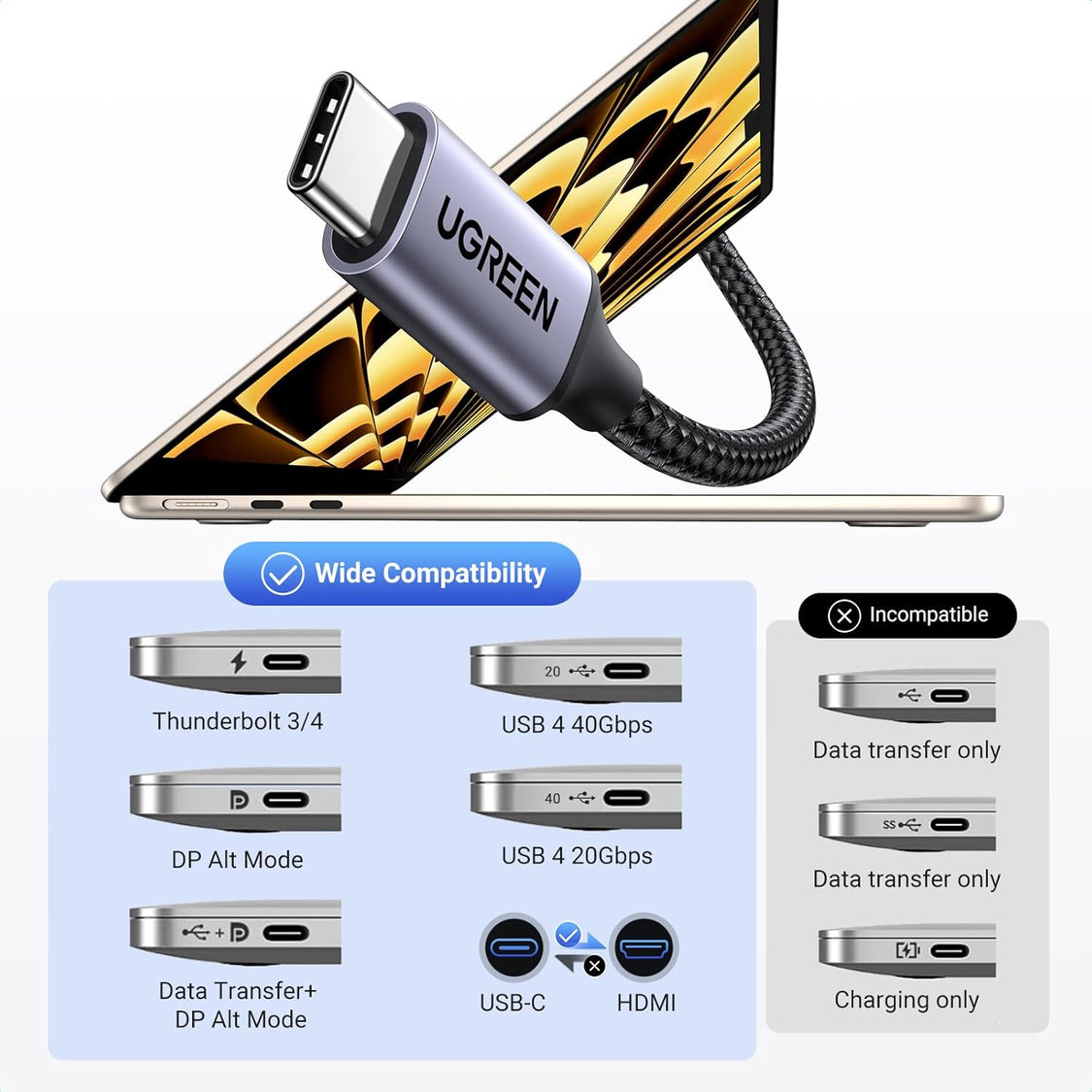
A USB-C connector describes the port's shape, not everything it can do. Look for DisplayPort Alt Mode, Thunderbolt display support or a USB4 implementation with video output in your device's specification.
Video-capable laptop,
tablet, phone or handheld
Monitor, television
or projector
One-way only. Not for an HDMI-output PC, console or TV stick connecting to a USB-C monitor. Charge-only and data-only USB-C ports will not output video through it.
Apple devices
Compatible USB-C / Thunderbolt Macs, USB-C iPads and USB-C iPhones with external-display support. Lightning-only devices are not a direct match.
MacBook: up to 4K at 60Hz with this cable.Windows notebooks
Compatible Dell XPS, HP, Lenovo, Surface and other PCs. Check the specific USB-C port, not just the laptop's brand or series.
DP Alt Mode or compatible Thunderbolt / USB4 video output required.Android phones & tablets
Selected Galaxy S / Tab and Pixel models with wired video output. Mirroring and desktop-style modes depend on the exact device and OS.
USB-C alone is not a compatibility guarantee.Gaming handhelds
Compatible Steam Deck, ROG Ally and other handheld PCs with video-capable USB-C. Available resolutions depend on the handheld and display.
Display connection only; no charging passthrough.Brand marks identify device families, not universal compatibility or brand endorsement. Always confirm your exact model.
See the original UGREEN port guide
One screen for the task.
Another for everything else.
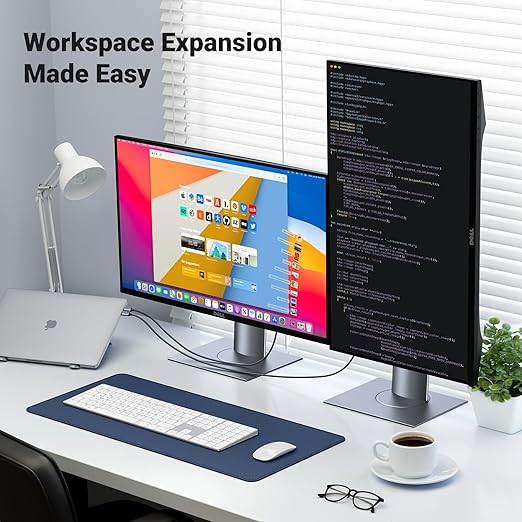
Mirror your screen
Show the same view on a second display for presentations, lessons and demonstrations.
Extend your workspace
Keep a document, spreadsheet or preview on the external monitor while using the other screen for your tools.
Mirror and extend modes depend on the device and operating system. This cable does not bypass a computer's external-monitor limit or turn one HDMI output into multiple independent displays.

A tidy metre.
A thoughtfully finished cable.

- Nylon braid
- A woven outer jacket for everyday handling, packing and desk use.
- Metal housings
- Aluminium-alloy connector shells protect the connector assemblies.
- Compact length
- The 1 m cable suits close laptop-to-monitor connections. Measure the route around your desk and screen before ordering.
- Direct connection
- No separate USB-C adapter plus HDMI lead to keep track of.
Leave slack at the ports. Avoid sharp bends, crushing the cable or pulling by the braided jacket; disconnect by holding the connector housing.
Connect. Select. Set your view.
Confirm the source port
Check for USB-C video output in your device's specification. Use a direct source connection for initial setup.
Connect the two ends
USB-C goes into the source. HDMI goes into the monitor, TV or projector. Leave enough slack so neither port is under strain.
Select the matching HDMI input
Use the display's input menu. If it offers an enhanced HDMI mode for higher resolutions or HDR, check its manual.
Choose your display settings
Select mirror or extend, then a supported resolution and refresh rate. Enable HDR where available and choose the display as the audio destination if required.
No picture? Start here.
Confirm USB-C video support first, then the selected HDMI input and a secure connection at both ends. Try the source directly without a dock, restart display detection and test a lower supported resolution.
If another compatible source works with the same display, review the original device's output specification and display settings.
Picture works, but the refresh rate is lower than expected?
Check the display's exact HDMI input, source GPU / USB-C capabilities and OS settings. The panel's advertised maximum may differ between HDMI and DisplayPort inputs. Select a known-supported resolution and refresh rate before enabling HDR or higher colour depth.
For MacBook use, this model is listed for a maximum of 4K at 60Hz. It does not support VRR, G-Sync or FreeSync.
The essentials, clearly listed.
| Brand / SKU | UGREEN / 35596 |
|---|---|
| Cable type | USB-C male to HDMI male display cable |
| Cable length | 1 metre |
| Signal direction | USB-C video source to HDMI display |
| HDMI designation | HDMI 2.1 |
| Advertised modes | Up to 8K 60Hz; 4K 240 / 144 / 120Hz; 2K 240Hz |
| Source requirement | USB-C DisplayPort Alt Mode, or compatible Thunderbolt / USB4 video output |
| Colour / HDR | Advertised dynamic HDR and 12-bit colour processing; device and mode dependent |
| HDCP | HDCP 2.3 is listed for this model |
| Audio | Supported digital audio over the HDMI connection; formats depend on the equipment and software |
| MacBook output | Up to 4K at 60Hz, per this model's listing |
| Adaptive sync | No VRR, G-Sync or FreeSync |
| Construction | Nylon braid, aluminium-alloy housings and nickel-plated connectors |
| Not a substitute for | A charger, USB data cable, capture device, multi-monitor dock or HDMI-to-USB-C converter |
Specifications are based on the UGREEN India listing for SKU 35596 and its original product artwork. Maximum modes are capability claims, not a guarantee for every device combination.
Good questions.
Clear answers.
Will it work with any USB-C laptop?
No. The particular USB-C port must provide video output. Charging and file-transfer support alone are not enough.
Do I need Thunderbolt?
Not necessarily. A compatible USB-C port with DisplayPort Alt Mode can also work. The source's supported display modes still determine what you can use.
Can I get 4K 120Hz, 144Hz or 240Hz?
These are advertised modes, but the entire setup must support the chosen timing. Check your GPU, USB-C video specification, OS and the display's HDMI input. MacBook use is listed at up to 4K 60Hz with this model.
Does it charge my laptop, tablet or handheld?
No. There is no USB-C charging passthrough. Plan a separate charging connection if your device needs power during use.
Can I connect a console to a USB-C monitor?
No. This cable works in the other direction: USB-C video source to HDMI display. Use a converter specifically designed for HDMI-to-USB-C for that application.
Does it add two external monitors?
No. One cable provides one HDMI display connection. Additional monitors need their own connections and source support.
Is it suitable for every phone with USB-C?
No. Wired video output is model-dependent. Check the exact iPhone, Galaxy, Pixel or tablet specification and its supported external-display modes before purchase.
Why is there a picture but no sound?
Select the connected HDMI display as the audio output and check its volume and speaker support. A monitor without speakers may require a separate audio device.
Will protected streaming content play?
Playback depends on the app, its external-display restrictions and a compatible protected-content path across the source and display. A cable's HDCP designation does not override an app's restrictions.
