

Phone and tablet charging
Use with a compatible USB-C PD/PPS charger for negotiated charging of Galaxy, Pixel, USB-C iPhone, iPad and other USB-C devices within the 60W ceiling.



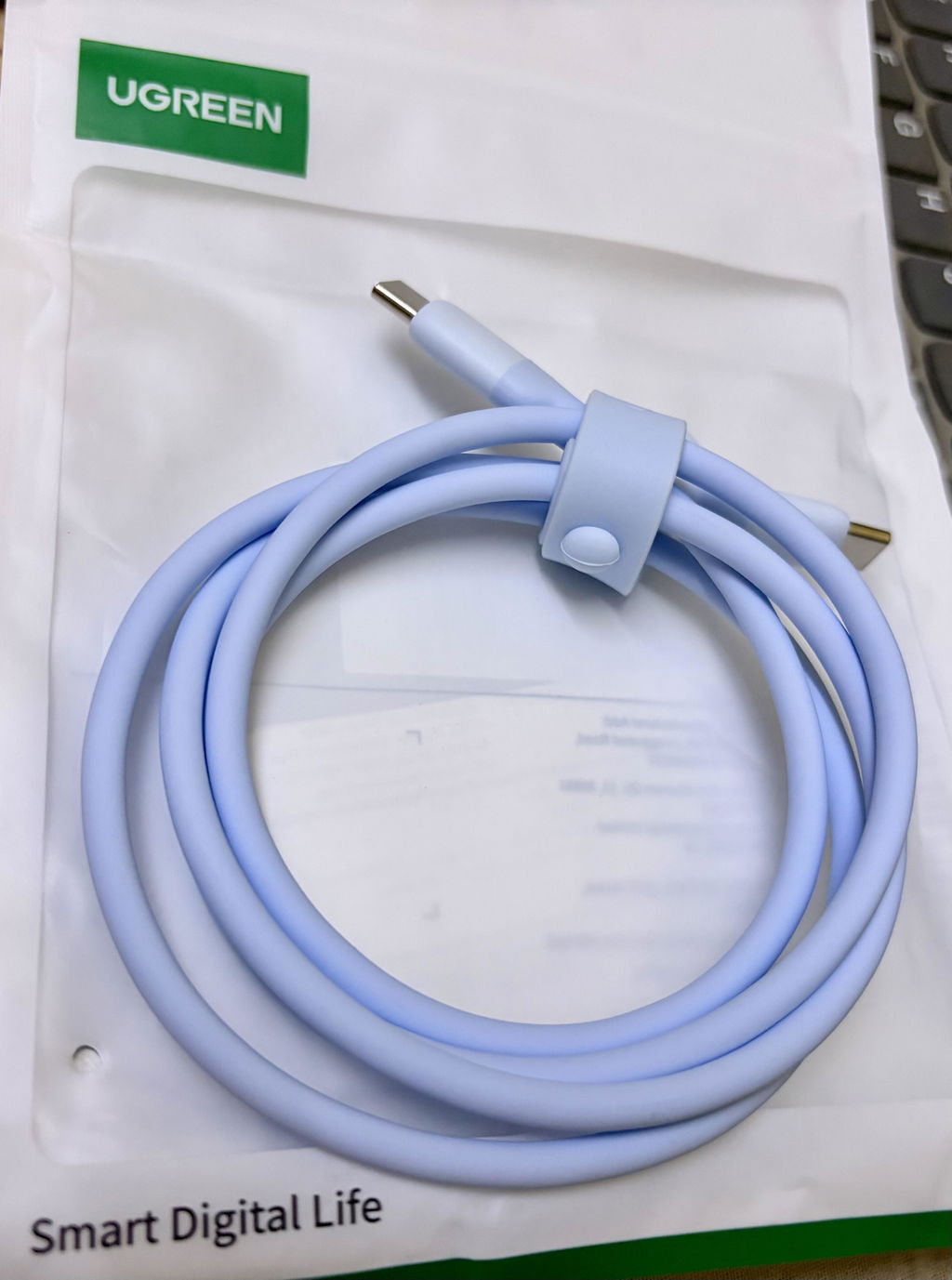
UGREEN 60W USB-C Silicone Cable, 1m, Blue (15279)
USB-C to USB-C silicone cable · exact 1m guide
UGREEN 60W USB-C Silicone Cable, 1m, Blue (15279) is a flexible USB-C male to USB-C male cable for charging compatible phones, tablets and laptops at up to 60W, plus USB 2.0 data synchronisation at up to 480Mbps.
The soft blue silicone jacket is designed for easier coiling and desk or travel use. The exact gallery lists 25,000 bending tests, but normal strain relief and gentle storage remain necessary.
This is a charging-and-USB-2.0 data cable, not a display, Thunderbolt, USB4 or 5Gbps cable. Sixty watts means a maximum of 20V/3A when a compatible USB-C PD/PPS source and receiving device negotiate that profile.

The defining functions of this exact SKU are separated from headline marketing so connector roles, power, data, length and battery limits remain clear.

Headline watts and gigabits are negotiated maximums, not universal results. Plan around every device, port, cable, charger, battery state and protocol in the path.
The 60W headline is not forced into every device. A 65W or higher USB-C charger can offer 20V/3A, but a phone may request 9V, PPS or a much lower profile. A laptop that needs 65W, 100W or more may charge slowly, report a low-power source or discharge under load.
This 3A cable does not need a 5A E-marker for its verified 60W ceiling. It must not be presented as a 100W, 140W or 240W cable; those higher profiles require a suitably rated 5A cable and compatible hardware.
The data path is USB 2.0. Real file-transfer speed is lower than 480Mbps after protocol and storage overhead, and may be limited further by the phone, computer, application or flash memory.
USB-C is a connector shape, not a guarantee of display output. This exact cable does not carry DisplayPort Alt Mode or video even when both connected devices have USB-C ports.

These practical examples keep the exact connector direction, supported protocol and safety limits in view.
Use with a compatible USB-C PD/PPS charger for negotiated charging of Galaxy, Pixel, USB-C iPhone, iPad and other USB-C devices within the 60W ceiling.
Charge a USB-C notebook whose input requirement is 60W or less. For higher-wattage systems, use the computer maker’s appropriately rated charger and 5A cable.
Connect a USB-C phone, tablet or accessory to a USB-C computer for USB 2.0 data after approving any trust or file-transfer prompt.
The soft one-metre lead coils compactly. Store it loosely and keep it separate from keys, liquids and plug pins.
Use this sequence for a controlled first connection. Follow the connected-device maker’s stricter instruction whenever it differs.
A connector that fits is only the first check. The host, accessory, operating system and power source must support the requested function.

These are the supported functions of this exact product when the complete connection is compatible.
These exclusions distinguish this SKU from visually similar cables, chargers, hubs, audio products and power stations.
These habits support reliable charging, data, audio and battery use while reducing avoidable connector strain.
Avoid these common mistakes even when the plug appears to fit.
Review these electrical, thermal, transport and physical limits before connecting valuable equipment.
Verified exact-model specifications are consolidated below. Maximum values remain conditional on the complete negotiated connection.
| Brand | UGREEN |
|---|---|
| Exact SKU | 15279 |
| Product type | USB-C to USB-C charging and USB 2.0 data cable |
| Connectors | USB-C male to USB-C male |
| Length | 1m |
| Colour / jacket | Blue silicone |
| Maximum charging power | Up to 60W |
| Maximum voltage / current | Up to 20V/3A with compatible USB-C PD equipment |
| Supported charging families | USB Power Delivery 3.0 and PPS-compatible negotiation when supported by both endpoints |
| Data standard | USB 2.0 |
| Maximum theoretical data rate | Up to 480Mbps |
| Video output | Not supported |
| E-marker requirement at listed ceiling | A 5A E-marker is not required for the verified 3A/60W ceiling |
| Exact gallery durability claim | 25,000 bending tests; controlled claim, not a lifetime guarantee |

Only components supported by the exact-model record or an official exact-SKU package list are included here. Scene devices and props are excluded.
Confirm connector direction, required protocol, power profile, cable length and package needs before choosing by appearance.
Disconnect power before inspection and change one variable at a time when diagnosing a connection.

Open any question for a concise exact-model answer. The native collapsible format keeps this long guide easy to scan on a phone.
Up to 60W at 20V/3A when the USB-C charger and receiving device negotiate that profile.
A standards-compliant 100W charger can negotiate a lower supported profile, but this cable remains limited to 60W and should not be used for a device that requires more.
It is PPS-compatible when both the USB-C charger and device support PPS; the cable cannot add PPS to an unsupported endpoint.
Yes when the phone and charger share a compatible USB-C PD/PPS profile. The phone selects its own maximum.
Yes for compatible USB-C laptops within the 60W ceiling. A higher-power notebook may charge slowly or not keep up under load.
Up to the USB 2.0 theoretical maximum of 480Mbps, with lower real throughput after overhead.
No. This exact cable does not carry DisplayPort Alt Mode or video.
No. It is a 60W charging and USB 2.0 data cable.
A 5A E-marker is not needed for the verified 3A/60W ceiling. Higher USB-C power profiles require a suitable 5A electronically marked cable.
No wall charger is identified as included.
It is the exact gallery’s controlled flex-test statement. It is not a guarantee against crushing, sharp folding, pets or misuse.
Charging follows the lowest supported limit among the charger, cable, device, battery state and temperature. Many phones deliberately request far less than 60W.
This exact-SKU guide was reconciled against the current UGREEN India product record, every live Shopify-owned gallery asset and the official UGREEN or safety references listed below. Connector roles, cable lengths, power profiles, Wh ratings, port sharing and package items were kept only where they could be tied to this exact item or its documented electrical family.
Illustrated speed, charge-time and device-count results are examples rather than universal promises. The connected-device manual, charger label, cable rating, operating-system support and current transport rules remain decisive.
The corrected title, SEO fields, specifications and compatibility statements in this draft all refer to SKU 15279. Only media attached to the current exact Shopify product record has been selected, and each selected image appears once as a large contextual figure with its own caption.
Use the SKU as the final identity check on the product page, packaging and invoice. When a device, charger, airline or safety manual gives a stricter power, signal, plug, battery, temperature or transport instruction, that instruction takes priority.
GST Invoice available, just mail back with details to order confirmation mail.
GST Invoice, Warranty, authenticity, faster support
The wire is thick and works well with iPhone 17. Go for it
Best quality
Best

USB-C to USB-C silicone cable · exact 1m guide
UGREEN 60W USB-C Silicone Cable, 1m, Blue (15279) is a flexible USB-C male to USB-C male cable for charging compatible phones, tablets and laptops at up to 60W, plus USB 2.0 data synchronisation at up to 480Mbps.
The soft blue silicone jacket is designed for easier coiling and desk or travel use. The exact gallery lists 25,000 bending tests, but normal strain relief and gentle storage remain necessary.
This is a charging-and-USB-2.0 data cable, not a display, Thunderbolt, USB4 or 5Gbps cable. Sixty watts means a maximum of 20V/3A when a compatible USB-C PD/PPS source and receiving device negotiate that profile.
The defining functions of this exact SKU are separated from headline marketing so connector roles, power, data, length and battery limits remain clear.
Headline watts and gigabits are negotiated maximums, not universal results. Plan around every device, port, cable, charger, battery state and protocol in the path.
The 60W headline is not forced into every device. A 65W or higher USB-C charger can offer 20V/3A, but a phone may request 9V, PPS or a much lower profile. A laptop that needs 65W, 100W or more may charge slowly, report a low-power source or discharge under load.
This 3A cable does not need a 5A E-marker for its verified 60W ceiling. It must not be presented as a 100W, 140W or 240W cable; those higher profiles require a suitably rated 5A cable and compatible hardware.
The data path is USB 2.0. Real file-transfer speed is lower than 480Mbps after protocol and storage overhead, and may be limited further by the phone, computer, application or flash memory.
USB-C is a connector shape, not a guarantee of display output. This exact cable does not carry DisplayPort Alt Mode or video even when both connected devices have USB-C ports.
These practical examples keep the exact connector direction, supported protocol and safety limits in view.
Use with a compatible USB-C PD/PPS charger for negotiated charging of Galaxy, Pixel, USB-C iPhone, iPad and other USB-C devices within the 60W ceiling.
Charge a USB-C notebook whose input requirement is 60W or less. For higher-wattage systems, use the computer maker’s appropriately rated charger and 5A cable.
Connect a USB-C phone, tablet or accessory to a USB-C computer for USB 2.0 data after approving any trust or file-transfer prompt.
The soft one-metre lead coils compactly. Store it loosely and keep it separate from keys, liquids and plug pins.
Use this sequence for a controlled first connection. Follow the connected-device maker’s stricter instruction whenever it differs.
A connector that fits is only the first check. The host, accessory, operating system and power source must support the requested function.
These are the supported functions of this exact product when the complete connection is compatible.
These exclusions distinguish this SKU from visually similar cables, chargers, hubs, audio products and power stations.
These habits support reliable charging, data, audio and battery use while reducing avoidable connector strain.
Avoid these common mistakes even when the plug appears to fit.
Review these electrical, thermal, transport and physical limits before connecting valuable equipment.
Verified exact-model specifications are consolidated below. Maximum values remain conditional on the complete negotiated connection.
| Brand | UGREEN |
|---|---|
| Exact SKU | 15279 |
| Product type | USB-C to USB-C charging and USB 2.0 data cable |
| Connectors | USB-C male to USB-C male |
| Length | 1m |
| Colour / jacket | Blue silicone |
| Maximum charging power | Up to 60W |
| Maximum voltage / current | Up to 20V/3A with compatible USB-C PD equipment |
| Supported charging families | USB Power Delivery 3.0 and PPS-compatible negotiation when supported by both endpoints |
| Data standard | USB 2.0 |
| Maximum theoretical data rate | Up to 480Mbps |
| Video output | Not supported |
| E-marker requirement at listed ceiling | A 5A E-marker is not required for the verified 3A/60W ceiling |
| Exact gallery durability claim | 25,000 bending tests; controlled claim, not a lifetime guarantee |
Only components supported by the exact-model record or an official exact-SKU package list are included here. Scene devices and props are excluded.
Confirm connector direction, required protocol, power profile, cable length and package needs before choosing by appearance.
Disconnect power before inspection and change one variable at a time when diagnosing a connection.
Open any question for a concise exact-model answer. The native collapsible format keeps this long guide easy to scan on a phone.
Up to 60W at 20V/3A when the USB-C charger and receiving device negotiate that profile.
A standards-compliant 100W charger can negotiate a lower supported profile, but this cable remains limited to 60W and should not be used for a device that requires more.
It is PPS-compatible when both the USB-C charger and device support PPS; the cable cannot add PPS to an unsupported endpoint.
Yes when the phone and charger share a compatible USB-C PD/PPS profile. The phone selects its own maximum.
Yes for compatible USB-C laptops within the 60W ceiling. A higher-power notebook may charge slowly or not keep up under load.
Up to the USB 2.0 theoretical maximum of 480Mbps, with lower real throughput after overhead.
No. This exact cable does not carry DisplayPort Alt Mode or video.
No. It is a 60W charging and USB 2.0 data cable.
A 5A E-marker is not needed for the verified 3A/60W ceiling. Higher USB-C power profiles require a suitable 5A electronically marked cable.
No wall charger is identified as included.
It is the exact gallery’s controlled flex-test statement. It is not a guarantee against crushing, sharp folding, pets or misuse.
Charging follows the lowest supported limit among the charger, cable, device, battery state and temperature. Many phones deliberately request far less than 60W.
This exact-SKU guide was reconciled against the current UGREEN India product record, every live Shopify-owned gallery asset and the official UGREEN or safety references listed below. Connector roles, cable lengths, power profiles, Wh ratings, port sharing and package items were kept only where they could be tied to this exact item or its documented electrical family.
Illustrated speed, charge-time and device-count results are examples rather than universal promises. The connected-device manual, charger label, cable rating, operating-system support and current transport rules remain decisive.
The corrected title, SEO fields, specifications and compatibility statements in this draft all refer to SKU 15279. Only media attached to the current exact Shopify product record has been selected, and each selected image appears once as a large contextual figure with its own caption.
Use the SKU as the final identity check on the product page, packaging and invoice. When a device, charger, airline or safety manual gives a stricter power, signal, plug, battery, temperature or transport instruction, that instruction takes priority.