


UGREEN CR104 3M USB-A to RS232 DB9 Male Serial Adapter Cable with P...

UGREEN 3M USB-A to RS232 DB9 Male Serial Adapter Cable
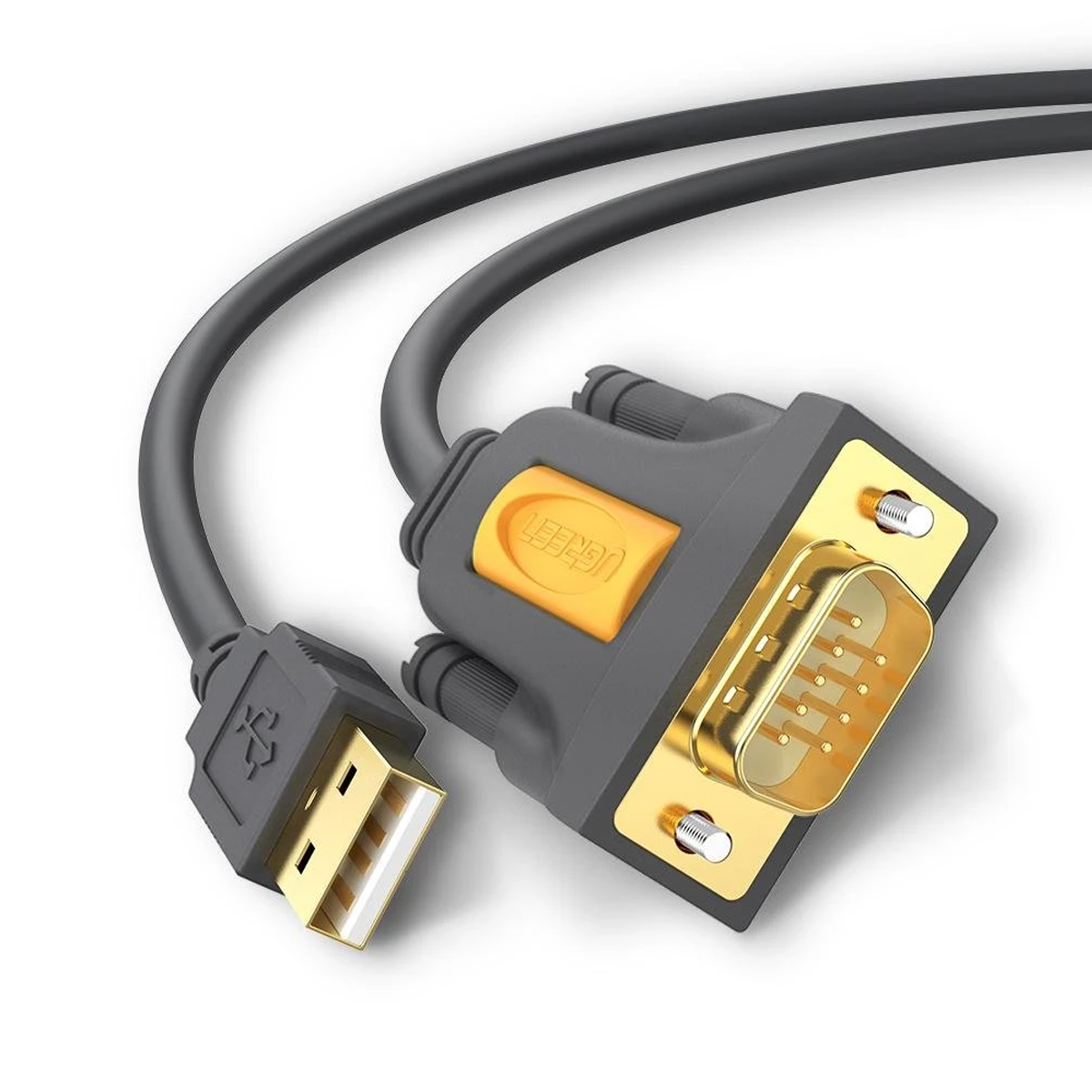
Add an RS232 serial COM port to a compatible USB-equipped computer. UGREEN CR104 combines a Prolific PL2303 conversion chipset, USB-A input, DB9 male serial output, up to 1Mbps listed communication speed and a three-metre cable for connecting compatible legacy, commercial and professional serial equipment.
Prolific Serial Chipset
Maximum Listed Rate
Extended Cable Reach
DB9 RS232 Connector
Add a Virtual RS232 COM Port to a USB Computer
The adapter converts USB communication from a compatible desktop or laptop computer into a standard nine-pin RS232 serial connection. Once recognised by the operating system, it appears as a virtual COM port that can be selected inside compatible serial, terminal, configuration or equipment-management software.
USB-A Computer Connection
Connects to a standard USB-A port on a compatible desktop computer, laptop, workstation or USB hub.
DB9 Male Serial Output
Connects to compatible equipment fitted with a DB9 female RS232 serial interface.
Virtual COM Port
Allows compatible software to communicate through an assigned COM port after driver recognition.

Secure Connections at Both Ends
The USB-A plug connects to the host computer. The nine-pin DB9 male connector includes side screws that can be tightened into a compatible female serial socket for a secure installation.
USB 2.0 Interface
Uses a standard USB-A host connection and is backward compatible with suitable USB host ports.
Gold-Plated Surfaces
Plated contact surfaces help resist corrosion and maintain consistent electrical contact.
DB9 Securing Screws
Threaded side screws help secure the adapter to compatible serial equipment.
DB9 Gender and Wiring Must Match the Equipment
The adapter has a DB9 male connector with exposed pins. The connected equipment normally requires a compatible female socket. Some installations may also require a gender changer, straight-through serial cable or null-modem adapter.
Verify These Details
- DB9 male or female connector required
- DTE or DCE equipment type
- Straight-through or null-modem wiring
- Required RS232 control signals
- Serial voltage and communication protocol
Stable USB-to-Serial Communication
The integrated Prolific PL2303 chipset converts USB data into RS232 serial communication and creates a virtual COM port recognised by compatible operating systems and serial applications.
Supported Serial Functions
- Transmit and receive data
- Hardware handshake signal support
- Automatic handshake operation where configured
- Remote wake support
- USB power-management support
- Adjustable COM-port communication settings
Configure the Connection to Match the Serial Device
The adapter supports serial communication rates up to the listed 1Mbps maximum. The actual baud rate must be supported by the connected equipment, driver, operating system and application.
Baud Rate
Select the rate specified by the connected equipment, such as 9600, 19200, 38400 or 115200 baud.
Data Format
Configure data bits, parity and stop bits according to the serial device manual.
Flow Control
Select no flow control, software flow control or RTS/CTS hardware flow control as required.
Incorrect Serial Settings Can Produce No Data or Garbled Data
Both sides of an RS232 connection must use the same communication parameters. A physical connection alone does not configure the protocol automatically.
Match the Device Manual
- COM port number
- Baud rate
- Data-bit length
- Parity mode
- Stop bits
- Flow-control method
DB9 RS232 Signal Assignment
The connector carries the standard receive, transmit, ground and modem-control signals commonly used by RS232 equipment.
Pins 1–3
Pin 1: DCD
Pin 2: RXD
Pin 3: TXD
Pins 4–6
Pin 4: DTR
Pin 5: Signal Ground
Pin 6: DSR
Pins 7–9
Pin 7: RTS
Pin 8: CTS
Pin 9: RI
Not Intended for Direct TTL, RS422 or RS485 Connections
The DB9 connector provides RS232 signalling. It must not be connected directly to exposed 3.3V or 5V UART pins on a microcontroller board without a suitable RS232 level converter.
Different Interfaces
- Not a TTL UART programming cable
- Not an RS422 converter
- Not an RS485 converter
- Not an RJ45 console cable
- Not a parallel-printer adapter
- Not a USB data-extension cable
Connect Legacy and Professional Serial Devices
The adapter is suitable for compatible equipment that uses a standard DB9 RS232 connection and is supported by the host operating system and application.
POS Equipment
Compatible cash registers, point-of-sale terminals and supported fiscal or receipt equipment.
Barcode Scanners
Connect supported DB9 serial barcode scanners and data-capture equipment.
Label & Serial Printers
Communicate with compatible serial label printers, receipt printers and specialist printing equipment.
Serial Modems
Connect compatible RS232 modems, ISDN terminal adapters and communications equipment.
GPS & Data Loggers
Access compatible GPS receivers, logging instruments and serial measurement equipment.
Control Equipment
Use with supported controllers and industrial devices after confirming protocol, voltage and pinout compatibility.
A DB9 Connector Alone Does Not Guarantee Compatibility
Equipment manufacturers can use different serial pinouts, protocols, handshake requirements and wiring arrangements even when the same DB9 connector is fitted.
Confirm before Installation
- The device uses true RS232 signalling.
- The DB9 connector gender is compatible.
- The required serial wiring is supported.
- The operating system supports the device software.
- The equipment can communicate through a USB virtual COM port.
- The correct serial settings are known.
Driver Recognition Creates the Virtual COM Port
The adapter works with compatible Windows, macOS and Linux systems where an appropriate Prolific PL2303 driver is available. Modern Windows systems may retrieve the driver automatically, while other configurations may require manual installation.
Windows
Compatible Windows systems may install the PL2303 driver through Windows Update or an approved driver package.
macOS
A compatible Prolific driver may be required. macOS security approval may also be required for third-party driver software.
Linux
Many Linux kernels include PL2303 support, but recognition can vary according to kernel, distribution and chipset revision.
Confirm That the Adapter Appears as a COM Port
Before opening the serial application, check that the operating system recognises the adapter and has assigned a COM or serial-device name.
Driver Guidance
- Use a driver suitable for the installed PL2303 revision.
- Prefer approved UGREEN or Prolific driver packages.
- Restart the system after installation when requested.
- Reconnect the adapter after driver installation.
- Note the assigned COM-port number.
Set Up the USB-to-Serial Connection
Connect the USB-A Plug
Insert the adapter into a compatible USB-A host port on the computer.
Allow Driver Recognition
Wait for automatic driver installation or install the appropriate PL2303 driver when required.
Identify the Serial Port
Check the assigned COM-port number in the operating system’s device or system information.
Connect the RS232 Equipment
Attach the DB9 male connector to a compatible DB9 female device and tighten the securing screws.
Configure the Serial Application
Select the assigned COM port and enter the baud rate, data bits, parity, stop bits and flow-control settings required by the equipment.
Test Communication
Send or receive a test command according to the equipment manufacturer’s instructions.
No Separate Power Adapter Required
The conversion circuitry receives operating power through the connected USB port, simplifying installation at workstations, service desks and equipment cabinets.
Power Notes
- No external adapter required for the converter
- Power is supplied by the USB host
- The adapter does not power large serial equipment
- The connected serial device may require its own supply
- Use a stable USB host connection
Tinned-Copper Conductors and Multi-Layer Protection
The cable uses dedicated conductors, internal shielding and a flexible PVC outer jacket to help maintain stable serial communication over the extended three-metre length.
Tinned-Copper Conductors
Designed for consistent conductivity and resistance to conductor oxidation.
Foil and Braided Shielding
Multiple shielding layers help reduce the effect of surrounding electrical interference.
Flexible PVC Jacket
Protects the cable during regular office, service, commercial and professional use.
Position the Computer and Serial Equipment More Flexibly
The 3M/10FT cable length is useful when serial equipment is installed under a counter, inside a cabinet, near a machine or away from the host computer.
Retail Counters
Route the cable between a computer and compatible POS or scanning equipment.
Equipment Cabinets
Reach supported controllers, modems or logging equipment installed away from the workstation.
Service Workstations
Maintain convenient access while configuring or diagnosing compatible serial devices.
Product Highlights
- Converts a USB-A host connection into an RS232 serial port.
- Creates a virtual COM port on compatible systems.
- Uses a Prolific PL2303 conversion chipset.
- Provides a DB9 male RS232 connector.
- Supports serial communication up to the listed 1Mbps.
- Carries transmit, receive and hardware-handshake signals.
- Supports remote wake and USB power management.
- Receives operating power from the USB host.
- Uses gold-plated connector surfaces.
- Uses tinned-copper conductors and multi-layer shielding.
- Provides a three-metre / ten-foot cable length.
- Supports compatible Windows, macOS and Linux systems.
Compatibility Checklist
- The computer must provide a compatible USB-A host port.
- The serial equipment must use true RS232 signalling.
- The adapter has a DB9 male connector.
- The connected equipment normally needs a DB9 female socket.
- Some equipment requires null-modem or custom wiring.
- The correct PL2303 driver may need to be installed.
- The assigned COM port must be selected in the application.
- Baud rate and serial framing must match the equipment.
- The cable is not a TTL UART programming adapter.
- RS422 and RS485 are not supported.
- Cutting plotter compatibility is not supported by the listed specification.
- Device-specific software and protocol support remain essential.
Technical Specifications
UGREEN CR104 USB-A to RS232 DB9 Serial Adapter Cable, SKU 20223.
| Specification | Details |
|---|---|
| Brand | UGREEN |
| Product Family | CR104 |
| SKU | 20223 |
| EAN / GTIN | 6957303822232 |
| Product Type | USB-A to RS232 DB9 serial converter adapter cable |
| Host Connector | USB Type-A male |
| Host Interface | USB 2.0 |
| Serial Connector | DB9 / DE-9 male with securing screws |
| Serial Standard | RS232 |
| Chipset | Prolific PL2303 |
| FTDI Chipset | Not used in the verified SKU 20223 specification |
| Maximum Listed Serial Rate | Up to 1Mbps, subject to device, driver and application support |
| Virtual COM Port | Created after compatible driver recognition |
| Serial Configuration | Baud rate, data bits, parity, stop bits and flow control configured through the operating system or serial application |
| Hardware-Handshake Signals | DCD, DTR, DSR, RTS, CTS and RI |
| Data Signals | RXD and TXD |
| Ground | Signal ground on DB9 pin 5 |
| DB9 Pin 1 | DCD — Data Carrier Detect |
| DB9 Pin 2 | RXD — Receive Data |
| DB9 Pin 3 | TXD — Transmit Data |
| DB9 Pin 4 | DTR — Data Terminal Ready |
| DB9 Pin 5 | GND — Signal Ground |
| DB9 Pin 6 | DSR — Data Set Ready |
| DB9 Pin 7 | RTS — Request to Send |
| DB9 Pin 8 | CTS — Clear to Send |
| DB9 Pin 9 | RI — Ring Indicator |
| Automatic Handshake | Supported where configured by the device, driver and software |
| Remote Wake | Supported as listed |
| USB Power Management | Supported as listed |
| Power Source | USB bus-powered |
| External Power Adapter | Not required for the converter |
| TTL UART | Not supported directly |
| RS422 | Not supported |
| RS485 | Not supported |
| Null-Modem Conversion | Not automatically provided; an appropriate null-modem adapter or cable may be required |
| Connector Finish | Gold-plated contact surfaces as listed |
| Conductor Material | Tinned copper |
| Listed Wire Construction | Mixed 24/28AWG conductor construction |
| Shielding | Multi-layer / triple-shielded construction as listed |
| Outer Jacket | Flexible PVC |
| Cable Length | 3 metres / approximately 10 feet |
| Colour | Black / dark grey with orange UGREEN accent |
| Operating-System Compatibility | Compatible Windows, macOS and Linux systems where an appropriate PL2303 driver is available |
| Driver Installation | May install automatically on supported Windows systems; manual installation may be required on other systems |
| Typical Compatible Equipment | Supported serial modems, POS terminals, barcode scanners, label printers, GPS receivers, data loggers and other DB9 RS232 equipment |
| Cutting Plotter Support | Not supported according to the listed product specification |
| Bare Microcontroller UART Support | Not supported directly; a suitable RS232-to-TTL interface is required |
| India Listed Dimensions | 12 × 12 × 4cm, likely retail-package dimensions |
| India Listed Weight | 163g |
| Package Contents | 1× UGREEN 20223 USB-A to RS232 DB9 adapter cable; driver media and printed documentation may vary by production batch |
| Warranty | Covered by the applicable UGREEN India warranty terms |
| GST Invoice | Available |
Frequently Asked Questions
Key information about UGREEN CR104, SKU 20223.
What does UGREEN 20223 do?
It converts a compatible USB-A computer port into an RS232 serial COM port for supported DB9 serial equipment.
Which chipset is used?
The verified SKU 20223 specification uses a Prolific PL2303 USB-to-serial chipset.
Is it an FTDI adapter?
No. SKU 20223 is identified as a Prolific PL2303 adapter, not an FTDI adapter.
What connector is on the serial end?
It has a nine-pin DB9/DE-9 male connector with exposed pins and securing screws.
Will it connect to a DB9 male device?
Not directly. Two male DB9 connectors require a suitable gender changer or serial cable, and the required wiring must also be confirmed.
Is it a null-modem cable?
It should not be assumed to provide null-modem crossover wiring. Some equipment requires a separate null-modem adapter or cable.
What is the maximum communication speed?
The India SKU is listed for serial communication up to 1Mbps. Actual speed depends on the device, driver and software.
Does it require a driver?
A compatible PL2303 driver is required for the virtual COM port. Supported Windows systems may install it automatically, while other systems may require manual installation.
How do I find the COM-port number?
On Windows, check Ports in Device Manager. On macOS or Linux, check the available serial-device entries after connecting the adapter.
Why is the device receiving unreadable characters?
The baud rate, parity, data bits or stop bits may not match the serial equipment. Configure the application according to the equipment manual.
Why is no data being received?
Check the COM port, TX/RX wiring, serial settings, driver status, connector gender, straight-through versus null-modem requirement and whether the device is powered.
Can it connect to a PLC or CNC machine?
Only when the equipment uses compatible RS232 signalling, DB9 wiring, serial protocol and software. Compatibility should be confirmed with the equipment manufacturer.
Can it connect directly to Arduino or microcontroller UART pins?
No. Bare UART pins normally use TTL voltage levels. A separate RS232-to-TTL level converter is required.
Does it support RS485?
No. It is an RS232 adapter. RS485 equipment requires a suitable USB-to-RS485 converter.
Does it support RS422?
No. RS422 is a different electrical interface and requires a compatible converter.
Does it need an external power supply?
The adapter circuitry is powered through USB. The connected serial equipment may still require its own power supply.
Does it work with Windows 11?
Prolific provides current Windows 11 drivers for supported PL2303 revisions. Compatibility depends on the chipset revision in the cable and the installed driver.
Does it work with macOS?
It can work with compatible macOS systems using the appropriate Prolific driver. Security approval may be required during installation.
Does it work with Linux?
Many Linux kernels include PL2303 support, but compatibility depends on the kernel, distribution and chipset revision.
What is the cable length?
The cable is three metres long, approximately ten feet.
UGREEN India Product Assurance
Genuine UGREEN product with GST invoice availability, applicable India warranty support and responsive local customer assistance.
-
Dimentions
-
Warranty
-
Length
-
Connector Type
-
Cable Type
-
Weight
GST Invoice available, just mail back with details to order confirmation mail.
Buy direct from official UGREEN India
GST Invoice, Warranty, authenticity, faster support
