


UGREEN CM933 5-Port Gigabit Easy Smart Managed Ethernet Switch with VLAN, QoS & Link Aggregation – 65956


UGREEN CM933 5-Port Gigabit Easy Smart Managed Ethernet Switch with...

UGREEN 5-Port Gigabit Easy Smart Managed Ethernet Switch
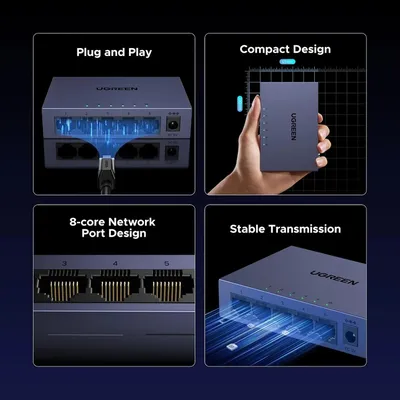
Build a faster, more organised wired network with five Gigabit Ethernet ports and flexible browser-based management. UGREEN CM933 combines plug-and-play Gigabit connectivity with VLAN, QoS, Link Aggregation and bandwidth-management capabilities in a compact, durable metal enclosure.
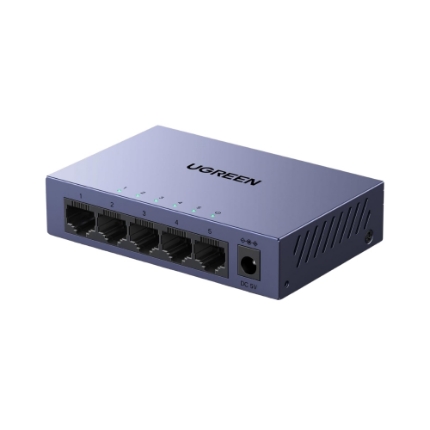
Gigabit RJ45
Maximum per Port
Switching Capacity
Easy Smart Management
Expand One Wired Network across Multiple Gigabit Devices
Each RJ45 interface automatically negotiates 10Mbps, 100Mbps or 1000Mbps according to the connected equipment. Connect routers, desktop computers, NAS systems, smart televisions, printers, cameras and gaming equipment through one compact switch.
1000Mbps Gigabit
Each port supports Gigabit Ethernet with compatible network equipment and cabling.
Auto-Negotiation
Automatically adapts each connection to a mutually supported 10, 100 or 1000Mbps link.
Auto MDI/MDIX
Modern automatic port detection removes the need to select a special crossover Ethernet cable.
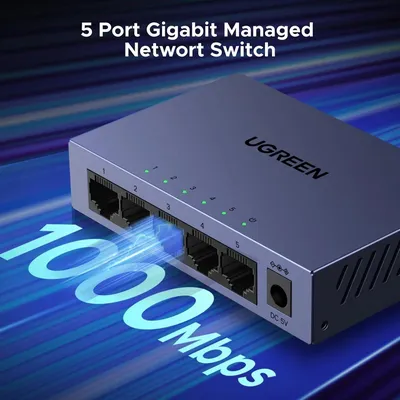
10Gbps Switching Capacity for Five Full-Duplex Gigabit Ports
The switch architecture is designed to move traffic efficiently between connected Gigabit devices while supporting simultaneous network activity across multiple ports.
Understanding 10Gbps
- Each RJ45 port supports up to 1Gbps.
- Five ports provide 5Gbps in each direction.
- Full-duplex switching capacity totals 10Gbps.
- A single client remains limited by its own Ethernet port.
- Actual application speed depends on the complete network.
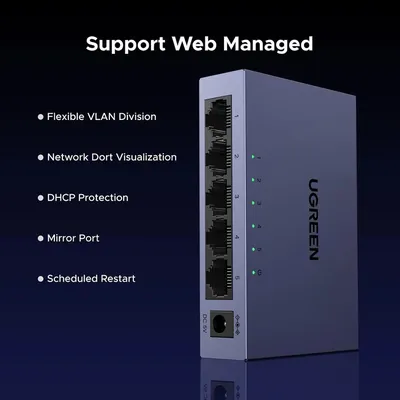
More Control than a Standard Unmanaged Switch
For basic network expansion, the switch can operate immediately after power and Ethernet cables are connected. When additional control is required, the browser-based management interface provides access to supported network-management functions.
VLAN
Create supported logical network segmentation to organise devices and separate selected network traffic.
QoS
Prioritise selected traffic so important applications can receive appropriate network priority during congestion.
Link Aggregation
Combine supported physical links into a logical connection when the switch and connected equipment are configured compatibly.
Bandwidth Control
Manage permitted bandwidth according to the supported configuration options available in the switch interface.
Port Monitoring
View supported port and link information directly through the network-management interface.
Browser Access
Configure supported smart-switch functions from a compatible computer and web browser on the local network.
Start Networking without Installing a Driver
The switch handles normal Ethernet forwarding automatically. Connect the power supply, connect the router or upstream network and attach Ethernet devices. Advanced management settings are optional and can be configured separately through the web interface.
No Computer Driver
Ethernet switching operates independently of a software driver on connected PCs.
Automatic Link Speed
Each port negotiates an appropriate Ethernet speed with the connected device.
LED Status
Front indicators provide quick visibility of power, link and network activity.
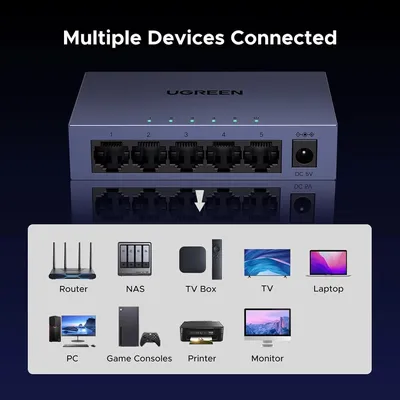
Connect Essential Home, Office and Small-Business Network Devices
Routers
Expand available wired LAN connections from a compatible router or network gateway.
NAS Systems
Connect compatible network storage for file sharing, backup and media access.
Desktop PCs
Add reliable wired connectivity for office workstations and home computers.
Smart TVs
Provide a wired network connection for compatible televisions and media players.
Gaming Consoles
Connect compatible PlayStation, Xbox and other Ethernet-equipped gaming systems.
Printers & Cameras
Add network printers, IP cameras and other RJ45-equipped devices to the wired LAN.
Combine Supported Ethernet Links for Greater Aggregate Capacity
Link Aggregation can group compatible physical Ethernet connections into a logical link for appropriate routers, servers, switches or NAS devices. It is especially useful where several simultaneous network flows need to share more aggregate bandwidth.
Link Aggregation Requires
- Compatible Ethernet ports on both devices
- Matching aggregation configuration
- Suitable Ethernet cables
- Correct switch management settings
- A workload capable of benefiting from multiple links
Link Aggregation Does Not Turn One Gigabit Port into a 2Gbps Port
Each physical RJ45 connection remains Gigabit Ethernet. Aggregation can increase total capacity available across multiple compatible traffic flows and may provide link redundancy depending on the configuration.
Best Applications
- Compatible multi-port NAS systems
- Servers serving multiple clients
- Switch-to-switch uplinks
- High-traffic office networks
- Networks requiring supported link redundancy
Organise Supported Devices into Separate Logical Networks
VLAN configuration helps organise selected wired devices into logical network groups. This can be useful for separating office equipment, guest devices, surveillance equipment or other supported network categories.
Office Segmentation
Separate supported departments or classes of network devices.
Guest Devices
Create supported logical separation between trusted equipment and guest-network devices.
Cameras & IoT
Organise supported surveillance or connected-device traffic separately from primary systems.
Prioritise Important Traffic during Network Congestion
QoS helps manage how supported network traffic is prioritised when several devices are using the network at the same time.
Video Meetings
Prioritisation can help important real-time traffic receive appropriate network preference.
Business Applications
Allocate suitable traffic priority to selected services according to network requirements.
Gaming Traffic
Supported QoS rules can help manage latency-sensitive traffic when the local network is busy.
QoS Does Not Increase the Internet Connection Speed
QoS controls traffic priority within the available network capacity. Broadband speed remains determined by the internet connection, router, network infrastructure and service provider.
Network Performance Depends On
- Internet plan and service provider
- Router and gateway capability
- Ethernet-device port speeds
- Network traffic and congestion
- Configured QoS policies
Passive Cooling for Reliable Everyday Networking
The compact metal enclosure protects the internal switching hardware and assists passive heat dissipation, making the switch suitable for desks, communications cabinets, home networks and small offices.
Design Highlights
- Durable metal enclosure
- Passive fanless operation
- Integrated ventilation openings
- Desktop placement
- Wall-mounting capability
- Compact footprint
Designed with Surge Protection for Greater Network Reliability
The switch includes surge-protection circuitry intended to improve resilience against transient electrical events on the network.
Installation Protection
- Use the supplied or specified power adapter.
- Use correctly installed mains power.
- Use suitable Ethernet infrastructure.
- Disconnect equipment during severe electrical conditions where appropriate.
- Surge protection does not make the device immune to lightning damage.
Ethernet Data Only — No Power over Ethernet Output
The five RJ45 interfaces provide Ethernet data connectivity. They do not supply PoE power to cameras, access points, IP phones or other powered network equipment.
For PoE Devices
- Use the device's own power adapter, or
- Use a compatible PoE injector, or
- Use a dedicated UGREEN PoE switch.
- Check the required IEEE PoE standard.
- Do not assume RJ45 automatically means PoE.
A Gigabit Switch Does Not Automatically Create Gigabit Internet
The switch can establish Gigabit Ethernet links between compatible devices. Internet throughput remains limited by the broadband connection, router, modem, network configuration and remote service.
For a 1Gbps Ethernet Link
- Use Gigabit-capable devices.
- Use suitable Cat 5e or higher Ethernet cabling.
- Check router and network-adapter settings.
- Ensure cables are correctly terminated.
- Confirm that no intermediate device is limited to 100Mbps.
Product Highlights
- Five RJ45 Gigabit Ethernet ports
- 10/100/1000Mbps auto-negotiation
- Full-duplex and half-duplex support
- Auto MDI/MDIX connectivity
- 10Gbps switching capacity
- Web-based Easy Smart management
- VLAN configuration
- Quality of Service management
- Link Aggregation
- Bandwidth control
- Metal enclosure with passive cooling
- Desktop or wall installation
Compatibility Checklist
- Each physical Ethernet port supports up to 1Gbps.
- 10Gbps refers to total switching capacity.
- This model does not provide PoE.
- Managed features require configuration through the web interface.
- Link Aggregation requires compatible equipment at both ends.
- QoS prioritises traffic but does not increase broadband speed.
- Gigabit operation requires compatible Ethernet equipment.
- Use Cat 5e or better cabling for Gigabit networks.
- Advanced VLAN capabilities depend on the installed firmware.
- This is an Easy Smart managed switch rather than a router.
Technical Specifications
UGREEN CM933 5-Port Gigabit Ethernet Easy Smart Managed Switch.
| Specification | Details |
|---|---|
| Brand | UGREEN |
| Model | CM933 |
| Core SKU | 65956 |
| Regional SKU | 65956EU commonly documented; verify current India package before publishing regional suffix |
| EAN / GTIN | 6941876269747 |
| Product Type | 5-Port Gigabit Ethernet Easy Smart Managed Switch |
| RJ45 Ports | 5 |
| Port Speed | 10/100/1000Mbps auto-negotiation |
| Maximum Speed per Port | 1000Mbps / 1Gbps |
| Switching Capacity | 10Gbps |
| Duplex Modes | Full duplex and half duplex |
| Auto MDI/MDIX | Supported |
| Management Type | Easy Smart web-based management |
| VLAN | Supported management function |
| QoS | Supported management function |
| Link Aggregation | Supported management function with compatible network equipment |
| Bandwidth Control | Supported |
| Port Monitoring | Web-management visibility for supported port information |
| Basic Operation | Plug and play; no computer driver required for normal Ethernet switching |
| PoE | No |
| Housing | Metal |
| Cooling | Passive / fanless |
| Installation | Desktop or wall mounting |
| LED Indicators | Power and Ethernet link/activity indicators |
| Power Input | DC 5V; regional CM933 specifications list 5V / 1A |
| Surge Protection | Supported; exact current India numerical rating should be verified from packaging |
| Jumbo Frame | Regional CM933 catalogue lists up to 15K; verify current India firmware before publishing as a guaranteed specification |
| Typical Compatible Equipment | Routers, desktop computers, laptops through Ethernet adapters, NAS systems, printers, smart TVs, game consoles, IP cameras and other RJ45 network devices |
| Recommended Gigabit Cabling | Cat 5e or higher |
| Colour | Grey / Space Grey |
| Warranty | 2 Year UGREEN India warranty, subject to applicable warranty terms |
| GST Invoice | Available |
Frequently Asked Questions
Key information about the UGREEN CM933 5-Port Gigabit Easy Smart Managed Switch.
What is the UGREEN CM933 used for?
It expands a wired Ethernet network with five Gigabit RJ45 ports while also providing supported web-based network-management functions.
Is this a managed or unmanaged switch?
CM933 is an Easy Smart managed switch. Basic Ethernet switching is plug and play, while additional functions are configured through its browser-based management interface.
How many Gigabit ports does it have?
It has five RJ45 ports, each supporting 10, 100 and 1000Mbps auto-negotiation.
Does every port support 1Gbps?
Yes, provided the connected network equipment and Ethernet cable also support Gigabit Ethernet.
What does 10Gbps switching capacity mean?
It refers to the aggregate full-duplex switching capacity across the five Gigabit ports. An individual port remains limited to 1Gbps.
Does it support VLAN?
Yes. VLAN configuration is available through the supported web-management interface.
Does it support QoS?
Yes. QoS management can be used to prioritise supported network traffic when required.
Does it support Link Aggregation?
Yes. Supported physical ports can be aggregated when the connected device and switch are configured compatibly.
Will Link Aggregation make one computer run at 2Gbps?
Not normally. Each physical port remains a 1Gbps link. Aggregation is primarily used to increase total capacity across multiple flows and compatible multi-port equipment.
Does this switch provide PoE?
No. CM933 does not supply Power over Ethernet through its RJ45 ports.
Can it be used with an IP camera?
Yes for Ethernet data when the camera is powered separately or through suitable external PoE equipment. The switch itself does not supply PoE.
Can it be used with a NAS?
Yes. Gigabit Ethernet NAS devices can connect directly, and supported multi-port NAS systems may also be able to use Link Aggregation.
Does it require a driver?
No driver is required for normal Ethernet switching. Advanced management is accessed through a compatible web browser.
Does it increase internet speed?
The switch provides Gigabit-capable local Ethernet connections. Actual internet speed remains limited by the broadband plan, router, modem and service provider.
Can it be mounted on a wall?
Yes. The metal switch is designed for desktop or wall-mounted installation.
Does it have a cooling fan?
No active fan is required. The metal housing and ventilation design provide passive heat dissipation.
What Ethernet cable should be used?
Cat 5e or higher-quality Ethernet cabling is recommended for reliable Gigabit operation.
UGREEN India Product Assurance
Genuine UGREEN networking product with GST invoice availability, applicable India warranty support and responsive local customer assistance.
GST Invoice available, just mail back with details to order confirmation mail.
রিচ টেক্সট শিরোনাম
আপনার দোকান সম্পর্কে তথ্য আপনার গ্রাহকদের সাথে শেয়ার করুন। একটি পণ্য বর্ণনা করুন, ঘোষণা শেয়ার করুন, অথবা আপনার দোকানে গ্রাহকদের স্বাগত জানান।
